"I want to record my guitar. But DAWs seem difficult..."
If that's you, GarageBand is the answer.
It comes preinstalled on Mac, and it's free. Yet it has all the features you need to record guitar.
This article walks you through recording guitar in GarageBand from start to finish.


I started out recording on an iPad with an iRig.
Then I moved to Mac, and now I record at home with Logic Pro. I'm writing from the point of view of someone who has used both setups.
What you'll learn in this article
・The specific steps for recording guitar in GarageBand
・The differences between the Mac and iPhone/iPad versions
・The gear you need and how to connect it
・Editing and exporting after you record
Are the Mac and iPhone/iPad Versions of GarageBand Operated the Same Way?
This is probably what you're wondering about first.
Here is the short answer.
The basic recording flow is almost the same. But the screens and the finer controls are different things.
The Mac version and the iOS version (iPhone and iPad) are actually built as separate apps.
Even so, the flow is the same: create a track, set the input, record, export.
| Mac version | iPhone / iPad version | |
|---|---|---|
| Price | Free (preinstalled) | Free |
| Recording flow | Almost the same | |
| Screen design | Wide screen, close to Logic Pro | Dedicated screen built for touch |
| Guitar amp feature | Based on Amp Designer | Amp feature (simplified) |
| External plugins | Supports AU plugins | AUv3 only (limited) |
| Project sharing | Open each other's projects via iCloud | |
The instructions and screenshots in this article all use the Mac version. The screens on iPhone and iPad differ, but the order of what you do is the same, so you can read it across.
What You Need to Record Guitar in GarageBand
A guitar and a Mac alone won't give you a good recorded sound.
At minimum, get the following gear together.
Audio interface [most important]
This is the device that connects your guitar to your Mac.
Whether you have one or not changes the quality of your recorded sound at its root.
You can pick up an amp's sound with your Mac's built-in mic. But honestly, I don't recommend it. It will be full of noise.
In my iPad days, I used an iRig, a simple interface for smartphones.
It was convenient and great for beginners. But when I moved to Mac and changed to a regular audio interface, the resolution of the sound was completely different.
I explain how to choose an interface in detail in this article.
-
-
What Is an Audio Interface? How a Guitarist Should Choose One Without Failing
You want to record guitar on your PC. When you think that, the first thing you need is an audio interface. But "I've heard the name, but I don't know what it does." Many people feel that way. This article explains the basics and how to choose from a guitarist's point of view. I've included my own mistakes and tried to make it as clear as I can. Recommended for Anyone who wants to know what an audio interface is in the first place Anyone who wants to record guitar or bass at home Anyone who wants to choose the ...
Guitar cable and headphones
You need one guitar cable to connect your guitar to the interface. The one you normally plug into your amp is fine.
Headphones are essential too.
If you record while playing sound through speakers, that sound can leak back into the mic or the input. Headphones are the basic way to monitor.
-
-
Best Studio Monitor Headphones for Home Recording | Closed-Back vs Open-Back and 9 Picks for Guitarists
"I mixed on regular listening headphones, and when I played it on my phone the low end was hollow..." It's a failure every guitarist who starts home recording experiences at least once. The cause is simple. Ordinary headphones have their sound flavored to make music "fun to listen to." If you mix using that sound as the reference, the balance falls apart when you hear it elsewhere. That's why you need monitor headphones. In this article, I'm ryo, 13 years of guitar and 8 years of DTM, and I explain how to choose monitor headphones and recommended models from the ...
I cover this "line recording" style in detail here.
-
-
Line Recording vs Mic Recording for Home Guitar | A Conclusion from 8 Years of Experience
Struggling Between Line and Mic Recording for Home Guitar? When you record guitar at home, the first thing you run into is choosing between "line recording" and "mic recording." The short answer: a guitarist who is just starting home recording should go with line recording. But this does not mean "mic recording is bad." Each has what it suits and doesn't. In this article, I'm ryo, 13 years of guitar and 8 years of DTM, and I sort it out. Based on experience using both, I put together the differences and how to choose. What Is the Difference Between Line ...
Setup Before You Record [Where Many People Get Stuck]
Once your gear is connected, it's time to set up GarageBand.
If you skip this, you'll get "no sound" or "can't record." Let's go through it in order.
1. Choose input and output in the settings
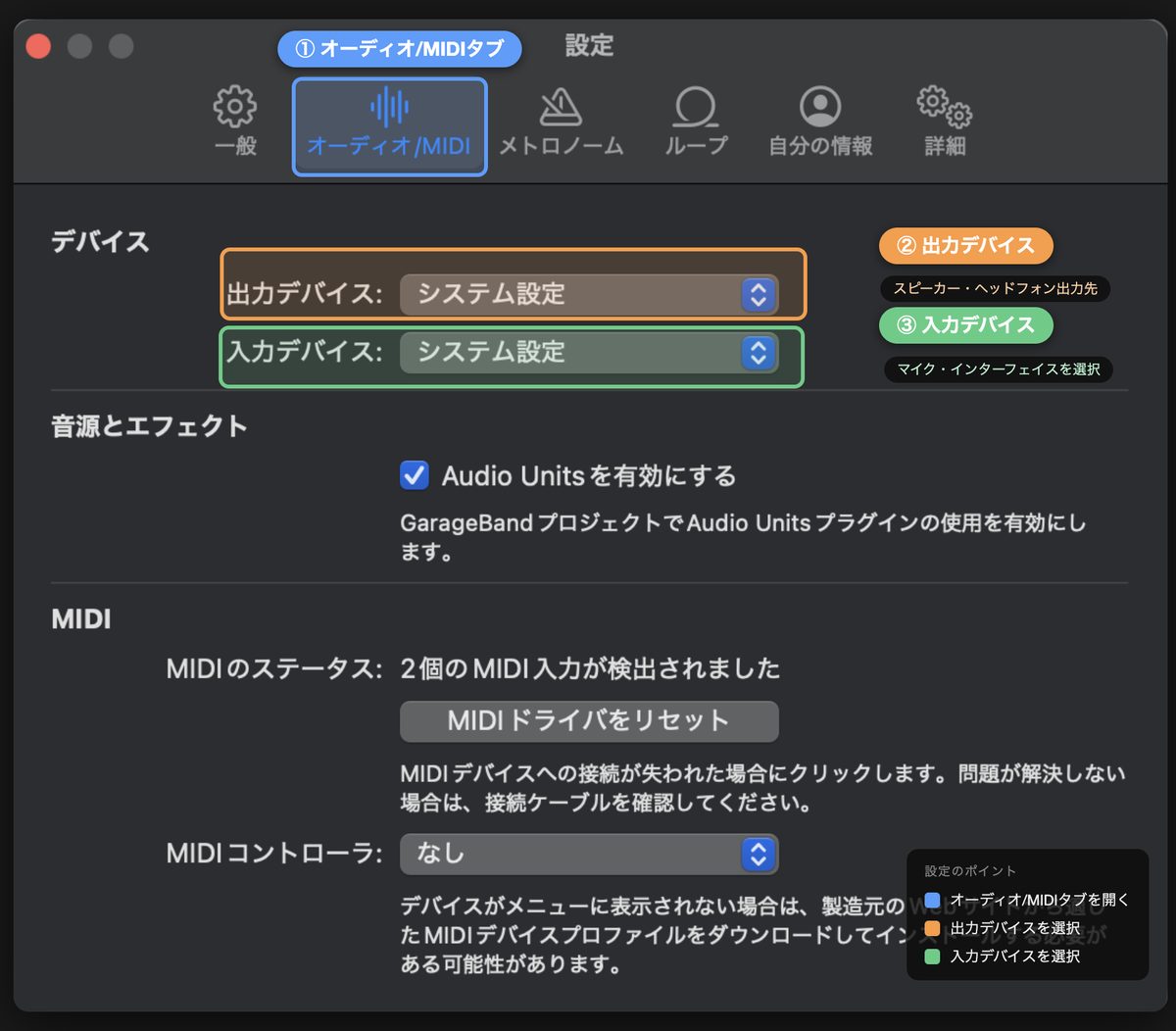
After you launch GarageBand, open the settings from the menu bar.
GarageBand → Settings → Audio/MIDI
・Input device: your audio interface
・Output device: your audio interface (the device your headphones are plugged into)
Sometimes the interface's name doesn't show up under input device.
In that case, check the USB connection and restart GarageBand.
2. Create an empty project
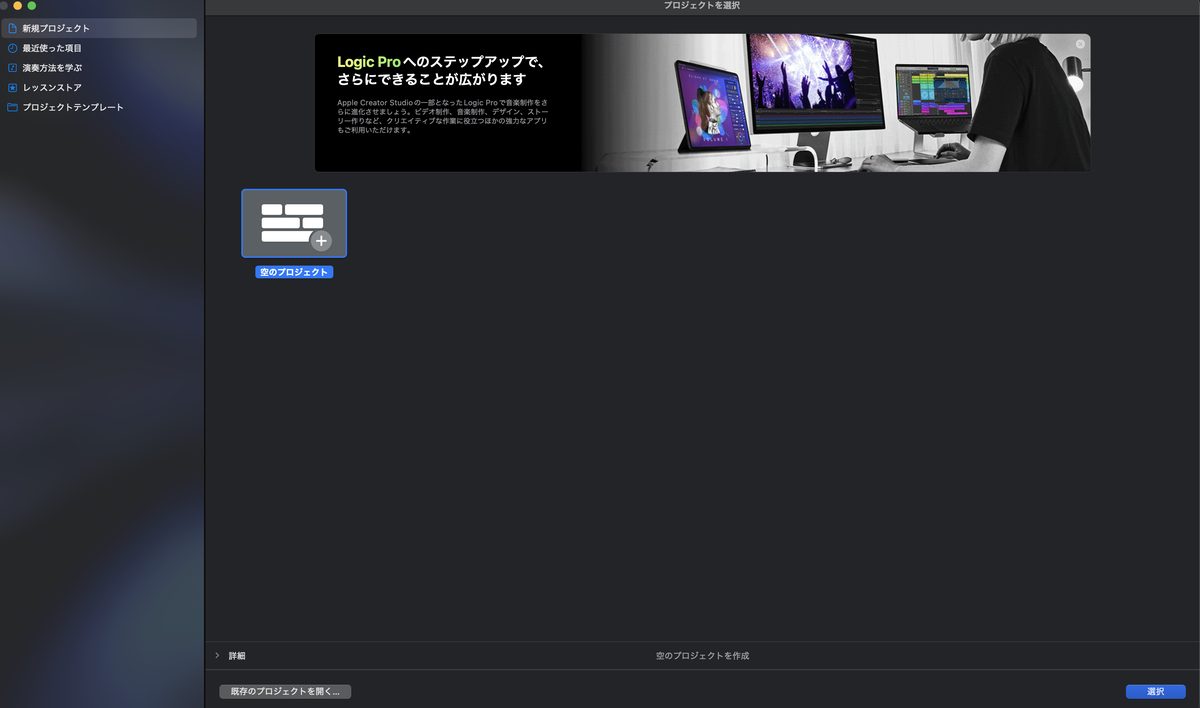
After the settings, choose "Empty Project" to create a new one.
It then asks what type of track you want.
Choose the "Guitar" icon (audio track) here.
You might hesitate between it and the mic icon. If you plug your guitar in directly, choose the guitar icon. An amp is set up for you from the start, which makes things easier.
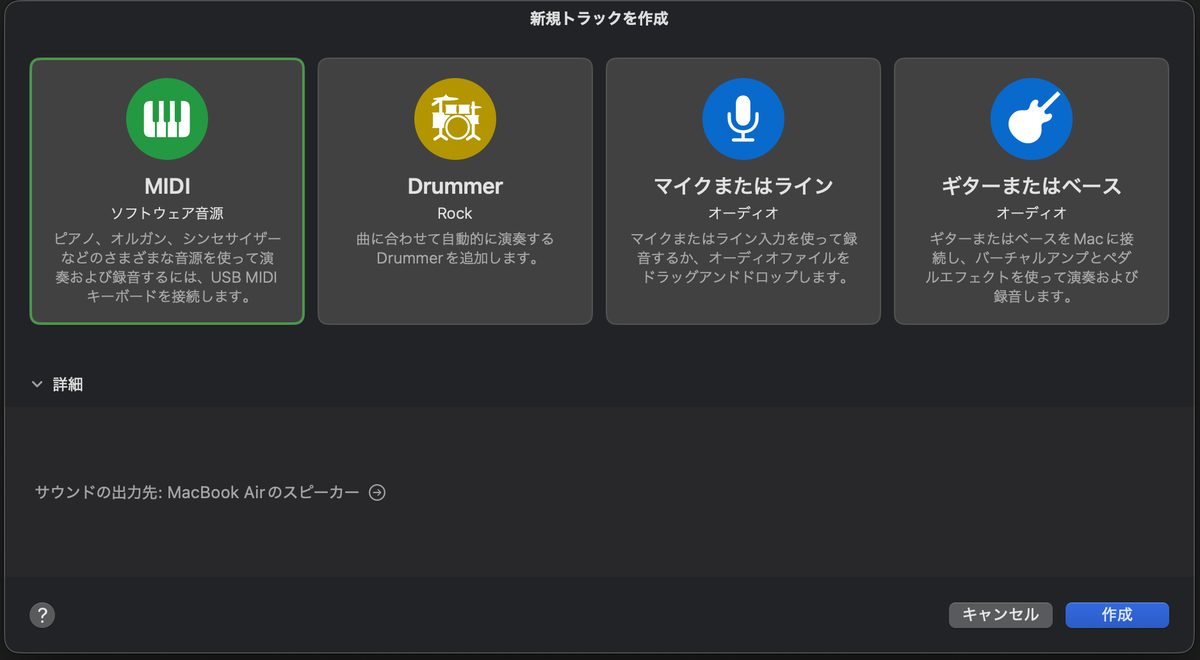
Steps to Record Guitar
Now it's time to record. There are three steps.
1. Turn on input monitoring
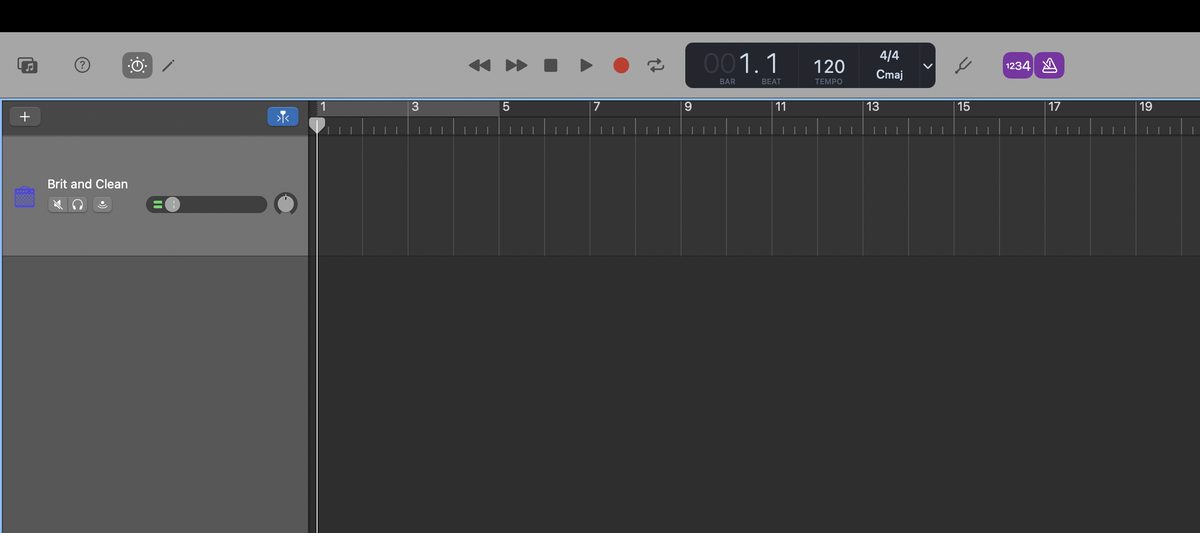
Turn on the input monitoring button on the track.
Now you hear what you play, with effects applied, through your headphones.
If you can't hear anything, also check that the input gain knob on your interface isn't turned too low.
If the meter swings all the way into red when you play hard, your gain is too high. Turn it down to a point where it doesn't go red even on your hardest strum. If the signal clips here, you can't fix it later.
I explain how to think about gain settings in detail in this article too.
-
-
Amp Simulator Basics | Signal Chain Order and How to Think About Gain
"With an amp simulator, what do I actually connect to what?" When you start recording guitar in DTM, this is the first question you run into. There are lots of knobs, and the order of effects isn't clear either. Raise the gain and the sound gets crushed, lower it and it lacks punch. This article explains amp simulators. I'll break down the basic signal chain order and how to think about gain from the point of view of a home-recording guitarist. I've left out difficult theory as much as possible. Learn this shape first, and you can apply it from ...
2. Set the metronome and count-in
Click the metronome icon at the top of the screen to turn it on and off. The shortcut is the K key.
Turn on the count-in too. After you press the record button, you get one bar of lead-in, so you can start playing without rushing.
3. Press R to start recording
When you're ready, just press the R key.
Recording starts. To stop, press the space bar.
It's fine if you make a mistake. Undo with Cmd + Z and record again as many times as you like.
Shortcuts worth remembering
・R: start recording
・Space: play / stop
・Enter: return to the start of the song
・K: metronome on / off
・Cmd + S: save
Shaping Your Guitar Tone in GarageBand
Once you've recorded, next is the tone.
Use the built-in amps and pedals
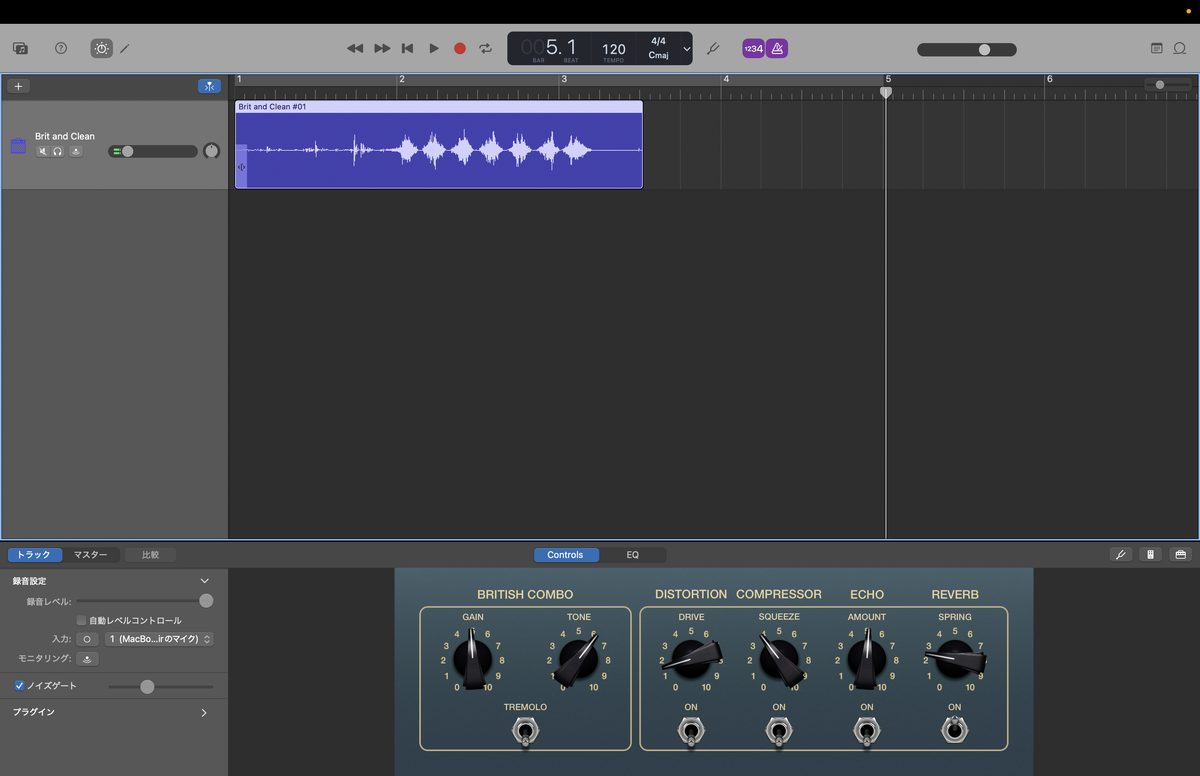
Press the B key to open Smart Controls, and the amp screen appears.
It has presets of classic amps, from clean to high gain.
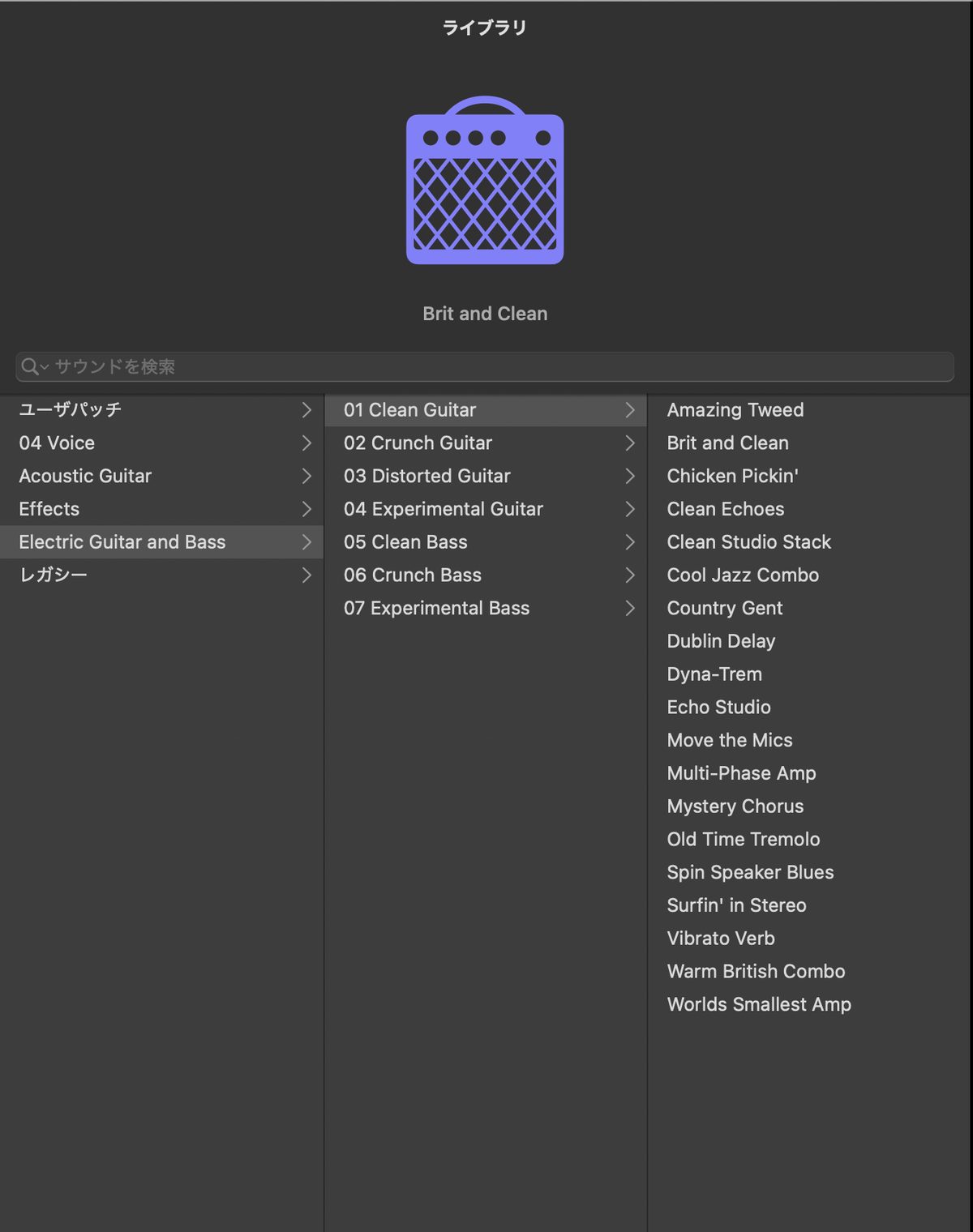
I recommend trying the presets one after another at first. You can switch from the library, which opens with the Y key.
GarageBand's amp feature is a simplified version of Logic Pro's Amp Designer. This review is a good reference for how capable it is.
-

-
Logic Pro's Built-In Amp Designer Review | How Far Can It Go for Guitar?
When you launch Logic Pro, Amp Designer is ready to use from the start. No extra cost. No installation. You can start playing right away. This review comes from someone with 13 years of guitar and 8 years of DTM. It is based on years of continued use. What Is Amp Designer? It is the amp simulator built into Logic Pro. It recreates the character of famous real amps, cabinets and mics, part by part. You can choose the amp, cabinet and mic independently of each other. Characteristics of All Models and the Genres They Suit Amp Designer's models are ...
When it feels limiting, use an external amp simulator
The Mac version of GarageBand supports AU plugins.
Serious amp sims like TONEX and AmpliTube work in GarageBand too.
You can buy both at Plugin Boutique.
Here are the product pages for TONEX MAX and AmpliTube 5 MAX v2.
Prices drop sharply during sales, so check the price before you choose.
-
-
7 Best Free Amp Simulators for Home Recording | How to Choose and Signal Chain Basics
"How far can you really go with free amp simulators?" Here is the short answer: today's free amp sims are fully at a professional working level. You can get usable sounds for a mix without buying a paid one. In this article, I introduce 7 free amp simulators that are truly usable, from the viewpoint of a home-recording guitarist. I also cover how to choose one and the basics of signal chain order. How Far Can Free Amp Simulators Go? Honestly, free amp sims used to be a "bonus." That is no longer true. There are two main reasons. The ...
-

-
TONEX MAX Review | An Honest Take, Plus How It Differs from SE, Standard and the Free CS
"Aren't all amp simulators basically the same?" Honestly, I used to think so too. But after I started using TONEX MAX, that idea was completely turned upside down. In this article, I'll share my honest impressions after using TONEX MAX heavily for home guitar recording over the years. The short version: it is my favorite guitar plugin right now. What you'll learn in this article Why TONEX MAX has an "air" that others don't My honest impressions from using it in home recording What kind of guitarist it suits What Is TONEX MAX? The Basics, Quickly TONEX MAX is software ...
Editing After You Record
Now let's tidy up the performance you recorded.
Splitting and trimming regions
A chunk of recorded waveform is called a "region."
Place the playhead and press Cmd + T to split the region at that point.
Cut out only the part where you made a mistake and re-record just that. This is the most common way to use it.
You can also trim a region's length by hovering over its edge and dragging.
Fix timing problems with Flex Time
"The performance was good, but one note was off the beat..."
That's when Flex Time helps.
You can move just one specific note within the waveform forward or back to fix the timing. You don't have to re-record everything, so it saves time.
But don't rely on it too much. Moving a note far makes the sound unnatural. Basically, get the rhythm right in your playing.
Export Your Finished Song
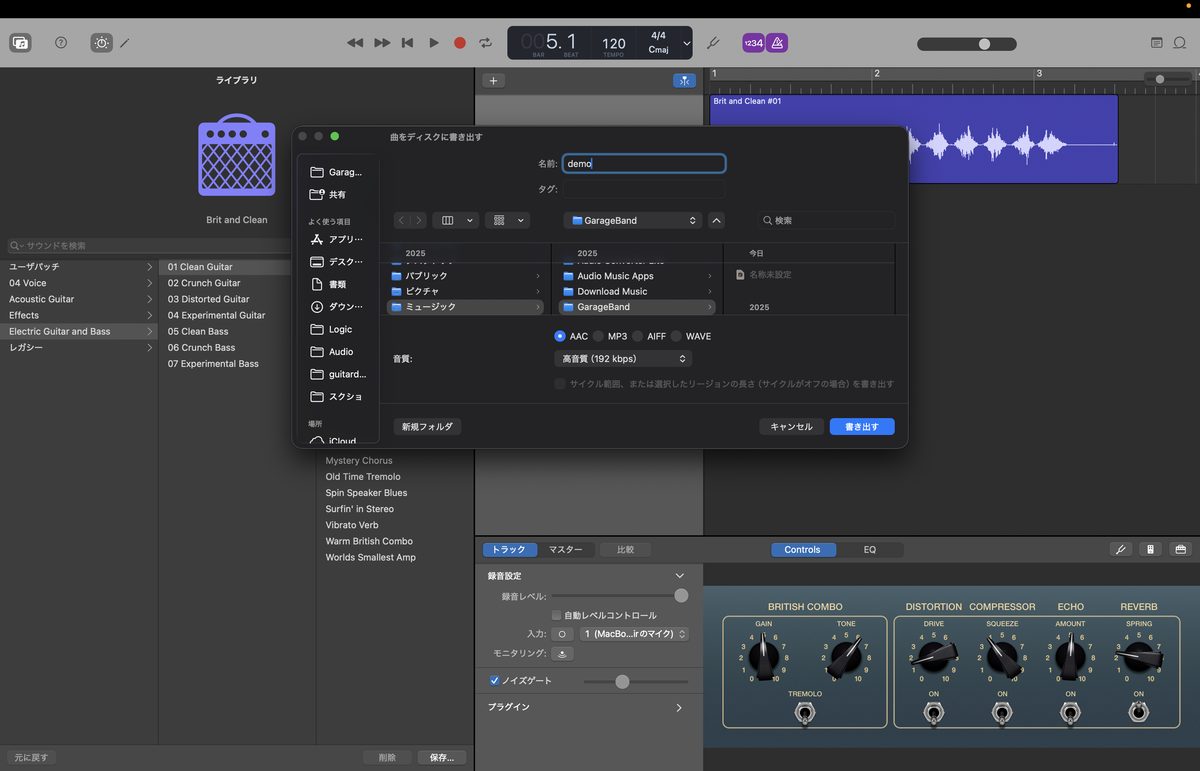
Finally, export the song as an audio file.
Here is something to watch out for.
"Save" and "Export" are different things.
| Save (Cmd + S) | Export | |
|---|---|---|
| File you get | GarageBand project | MP3 / AAC / AIFF, etc. |
| Use | Keep editing later | Send to someone, listen on a phone |
| Action | File → Save | Share → Export Song to Disk |
From the menu bar, choose "Share" → "Export Song to Disk".
Choose the format and quality, and you're done. If you only want people to listen, MP3 at 256 kbps is enough.
Tips for Recording on iPhone and iPad
From here, I have some extra notes for iPhone and iPad users.
Use a mobile interface such as an iRig to connect
You can't plug a guitar cable directly into an iPhone or iPad.
That's where a mobile interface like the iRig series comes in.
I used an iRig in my iPad days too.
It fits in a pocket, so you can record on the go. That convenience is a charm the Mac doesn't have.
For sound quality, Mac plus an interface has the edge
Let me be honest.
If you want to pursue sound quality, in the end a Mac plus a regular audio interface has the advantage.
I also felt my sound improve at once when I moved to Mac.
That said, the path of "start casually on iPhone, then build a Mac setup once you get hooked" is perfectly fine. Being able to carry your project over to the Mac through iCloud is another strength of GarageBand.
Stepping Up from GarageBand
If you use GarageBand a lot, the day will come when it feels limiting.
The main place to move to then is Logic Pro.
It is the upgraded version of GarageBand, so it feels almost the same. You can open your projects as they are.
-
-
How to Record Guitar in Logic Pro from Scratch (Beginner's Guide)
"I bought Logic Pro, but I don't know how to record my guitar." I'm sure many guitarists have that worry. I was the same at first. This article explains the steps for recording guitar in Logic Pro from zero. I explain technical terms as they come up. By the time you finish reading, you should be able to record one guitar track. What You Need to Record Guitar in Logic Pro First, let's check what you need. There are three main things. I/F is short for audio interface. Think of it as gear that brings the guitar's sound into the ...
If you want to compare other DAWs too, see this article.
-

-
Best DAWs for Guitarists Ranked | What to Choose for Home Recording
"I want to record guitar at home, but which DAW should I choose?" There are so many DAWs that people tend to stumble on the first one. In this article, I'm ryo, with 13 years of guitar and 8 years of DTM, and I've ranked the main DAWs honestly. The point of view is always that of a guitarist or band player. There are only three criteria. "Supported OS," "ease of recording guitar," and "budget." Look at just these, and you'll quickly find the one that fits you. 3 Points for Guitarists Choosing a DAW Before the ranking, let me ...
Summary: GarageBand Is the Best Way into Home Guitar Recording
Finally, here are the key points of this article.
・The Mac and iPhone/iPad versions have different screens, but almost the same recording flow
・The audio interface decides the quality of your recorded sound
・Recording is three steps: input monitoring, metronome, R key
・When the built-in amp feels limiting, you can add AU plugins
・Saving and exporting are different. To let others listen, you need to export
GarageBand is free.
If you have a Mac, you can start recording today.
Start by recording one phrase. Hearing your own playing objectively is the quickest path to getting better.
If you want to see the whole picture of home recording, read the roadmap article too.
-
-
The Complete Roadmap for Guitarists Starting DTM | Gear, PC, DAW, Amp Sims and Budget Plans
Recommended for You want to start DTM but don't know what to gather first You want to be able to make band demos yourself You want to step up from GarageBand You want to know how to choose an amp sim To give the conclusion first, guitarists have an advantage in starting DTM. You know chords. You have an image of band sound. You have a sense of "I want it to sound like this." DTM is just a tool for giving shape to that sense. I myself started home recording with just an iPad and an iRig. Without thinking ...

