"With an amp simulator, what do I actually connect to what?"
When you start recording guitar in DTM, this is the first question you run into.
There are lots of knobs, and the order of effects isn't clear either.
Raise the gain and the sound gets crushed, lower it and it lacks punch.
This article explains amp simulators. I'll break down the basic signal chain order and how to think about gain from the point of view of a home-recording guitarist.
I've left out difficult theory as much as possible.
Learn this shape first, and you can apply it from there.


What Is an Amp Simulator? A Rough Overview First
An amp simulator is software that recreates the sound of a real guitar amp.
Even in home recording, where you have no place for mics or amps, you can make realistic guitar sound.
There are well-known ones. For example, IK Multimedia's TONEX and AmpliTube, and Logic Pro's built-in Amp Designer.
An amp sim is software that recreates an "amp, speaker (cabinet) and mic" all together. That's why a sound that would normally need a full set of gear can be made entirely inside your PC.
The Basic Signal Chain | The Signal Flows in This Order
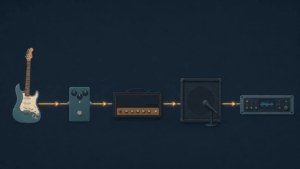
When you use an amp sim, it's important to picture the order in which the signal flows.
Think of it as building the same flow as a real guitar amp inside the software.
The basic chain order is as follows.
step
1Guitar (line input to the interface)
step
2Drive and pre-amp effects (overdrive, fuzz, etc.)
step
3Amp (preamp plus power amp)
step
4Cabinet plus mic (the part that picks up the speaker's sound)
step
5Time-based effects (reverb, delay, etc.)
The point is simple: drive goes before the amp, time-based effects go after the amp.
This is almost the same order in which guitarists line up pedals with real gear.
Why this order?
- Putting drive before the amp makes the outline of the sound clear
- Putting reverb after the amp gives natural reverb to the whole distorted sound
- Reversing the order distorts even the reverb tail, which easily gets muddy
How to Think About Gain | It's Not Just "How Much Distortion"
Gain is what confuses beginners most.
Gain has two main roles.
1. Amp gain = the amount of distortion
The amp's gain (GAIN or DRIVE) decides how distorted the sound is.
The higher it goes, the more it distorts; the lower, the closer to clean.
If you raise it too much, the sound gets crushed and you can't tell what you're playing.
2. Input gain = the size of the signal sent to the amp
The other important thing is the input level before the signal enters the amp.
If your audio interface input is too low, the amp won't sound the way it should.
If it's too high, the sound breaks up at the entrance.
Gain setting guideline
- While recording, aim for peaks around -12 dB to -6 dB on the meter
- If the red clip indicator appears, the input is too high
- Make distortion with the amp's GAIN, and keep the input right, without breaking up
When the Sound Feels "Thin or Harsh"
The sound you make with an amp sim may feel thinner than real gear.
Many people also complain that it is shrill and hurts the ears.
There are several causes, but first suspect too much gain and the mic position.
The causes here are wide-ranging, so I dig into them in a separate article.
The causes of and fixes for amp sim sound that feels degraded are explained in detail in this article.
"I loaded an amp simulator, but the sound is somehow thin." "It's full of noise and unusable." This is where people who come into DTM from guitar first stumble. Most of the causes aren't the performance of your gear. It's that the signal order and gain settings are still in the habit of a real amp. What's scarier is using it wrong. It degrades your guitar's sound. Even with expensive gear, one setting can ruin it. This article sorts out the basics of amp simulators, written from a guitarist's point of view. By the time you finish reading, you should ...
Why Amp Sims Make Your Sound Degrade, and the Right Settings | Signal Order, Gain and Your Interface
Cabinet and Mic Settings Change the Sound a Lot
The cabinet (speaker) and mic settings behind the amp also strongly affect the tone.
Even with the same amp, the impression changes completely with the type of mic and where you aim it.
| Mic position | Tonal tendency |
| Toward the center | Strong highs, bright and forward |
| Toward the edge | Calmer highs, mellow sound |
When the sound is harsh, just moving the mic toward the edge often solves it.
Start by "Taking Apart" a Preset
After reading this far, some of you may find it difficult.
But don't worry.
You don't need to build everything from scratch at the start.
There is a method I recommend: call up a preset you like and look at its settings one by one.
Taking a preset apart
- Choose a preset with a sound you like
- Raise and lower the gain and listen to the change
- Move the mic position and listen to the change
- Turn the time-based effects on and off to check their role
Learning "which knob changes what" through your own ears is the quickest way.
Summary | It's Not Scary Once You Know the Order and Gain
Here is a recap of the basics of amp simulators.
Summary of this article
- The basic order is "drive → amp → cabinet and mic → time-based effects"
- Make distortion with the amp's GAIN
- Keep the input gain right, without breaking up (aim for peaks of -12 to -6 dB)
- When the sound is harsh, move the mic toward the edge
- The quickest way to learn is to take presets apart
Once you have these basics, you can apply them to any amp sim.
If you want the whole picture of DTM for guitar, read the roadmap article too.
-
-
The Complete Roadmap for Guitarists Starting DTM | Gear, PC, DAW, Amp Sims and Budget Plans
Recommended for You want to start DTM but don't know what to gather first You want to be able to make band demos yourself You want to step up from GarageBand You want to know how to choose an amp sim To give the conclusion first, guitarists have an advantage in starting DTM. You know chords. You have an image of band sound. You have a sense of "I want it to sound like this." DTM is just a tool for giving shape to that sense. I myself started home recording with just an iPad and an iRig. Without thinking ...

