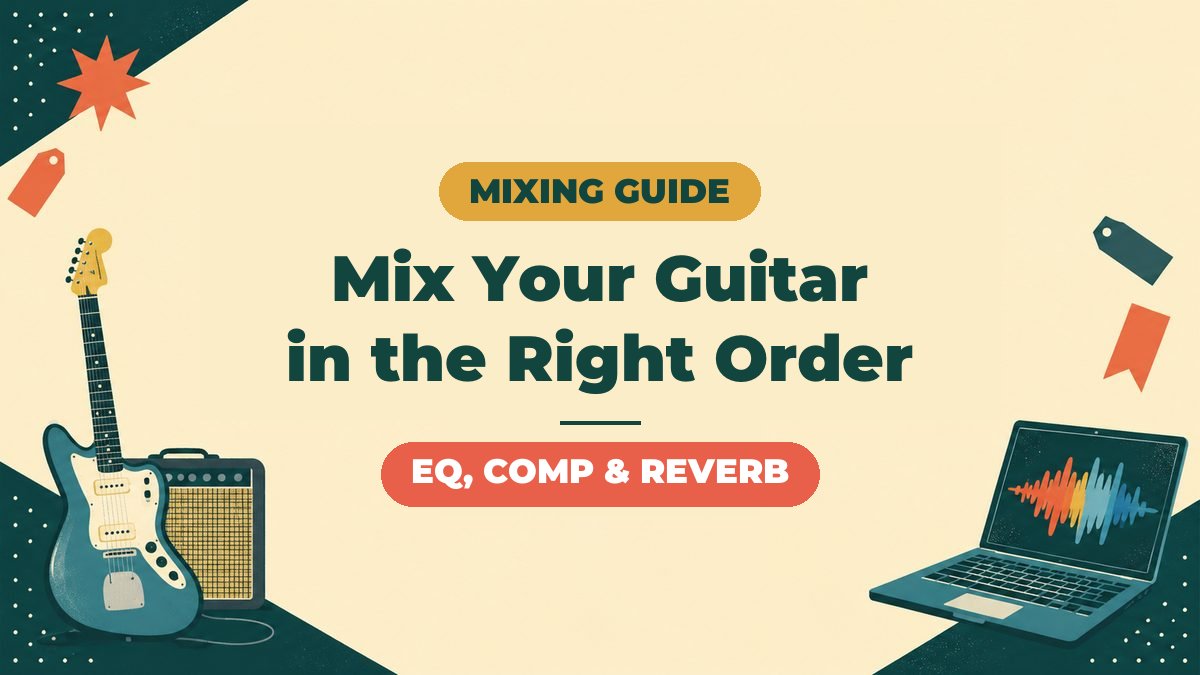
"I recorded it, but my guitar sounds kind of scattered..."
After you record guitar at home, the wall you always hit is mixing.
In fact, guitar mixing comes together all at once once you know the order of processing.
In this article, I'm ryo, with 13 years on guitar and 8 years of home recording.
The topic is the order in which to apply EQ, compression and time-based effects, plus tips for the settings.


I explain how to mix a whole band (drums and bass included) in this article.
-
-
Mixing Basics | Putting Together Two Guitars, Bass, Drums and Vocals
What Is Mixing? Why Is It Needed?If you stack recorded sounds as they are, problems like these happen. The guitar is too loud and you can't hear the bass The whole thing is "muddy" and doesn't cut through Only the drums sound like they're floating You don't need to overthink it. Once you have the basics, it comes together well. The Basic Mixing Steps | Follow This Order and You Won't Get Lost The steps are simple. First, turn off EQ and compression on all tracks. Build a balance that works with raw volume alone. Spread the instruments left and ...
Guitar Mixing Basics | The Order of Effects
First, the conclusion.
This is the basic order for processing a guitar track.
The basic chain for guitar mixing
1. Gain staging → 2. EQ (cuts) → 3. Compression → 4. EQ (boosts) → 5. Time-based effects (sends)
Why This Order?
The reason is simple.
Remove the unwanted sound first, even out the level, and decorate last.
That flow wastes the least effort.
For example, what happens if you compress with muddy lows still in place?
The compressor reacts to the muddy low end.
As a result, the mids you want to bring out don't lift well.
That's why cutting EQ comes before the compressor.
This order is not an absolute rule. But while you're a beginner, following the pattern is the quickest way to improve.
Step 1: Preparation Before Mixing | Gain Staging
There is something to do before you load any plugins.
That is gain staging (preparing the levels).
Even out the level of each track
Here is the only guideline you need.
Gain staging guideline
Adjust each guitar track so its meter peaks around -12 to -6 dB. Never let the master reach 0 dB.
If the level is too loud, the plugins after it won't work properly.
If it is too quiet, noise stands out.
80% Is Decided at the Recording Stage
To be strict about it, mixing is not magic.
If the recorded sound is bad, EQ can't fully fix it.
If you're unsure about shaping your amp simulator sound, check these first.
-
-
Amp Simulator Basics | Signal Chain Order and How to Think About Gain
"With an amp simulator, what do I actually connect to what?" When you start recording guitar in DTM, this is the first question you run into. There are lots of knobs, and the order of effects isn't clear either. Raise the gain and the sound gets crushed, lower it and it lacks punch. This article explains amp simulators. I'll break down the basic signal chain order and how to think about gain from the point of view of a home-recording guitarist. I've left out difficult theory as much as possible. Learn this shape first, and you can apply it from ...
-
-
Why Amp Sims Make Your Sound Degrade, and the Right Settings | Signal Order, Gain and Your Interface
"I loaded an amp simulator, but the sound is somehow thin." "It's full of noise and unusable." This is where people who come into DTM from guitar first stumble. Most of the causes aren't the performance of your gear. It's that the signal order and gain settings are still in the habit of a real amp. What's scarier is using it wrong. It degrades your guitar's sound. Even with expensive gear, one setting can ruin it. This article sorts out the basics of amp simulators, written from a guitarist's point of view. By the time you finish reading, you should ...
Step 2: Guitar EQ Tips | Start with Cuts
There is one iron rule of EQ.
Cut before you boost.
A low cut is the basics on every guitar track
The sweet spot of a guitar sits higher than you'd expect.
Below 80 to 100 Hz is almost entirely the territory of bass and kick.
Cut it off decisively.
Low cut guideline
Use a high-pass filter to cut below 80 to 100 Hz. For songs with deep distortion or lots of parts, you can go up to 120 Hz.
Guitar EQ Frequency Quick Reference
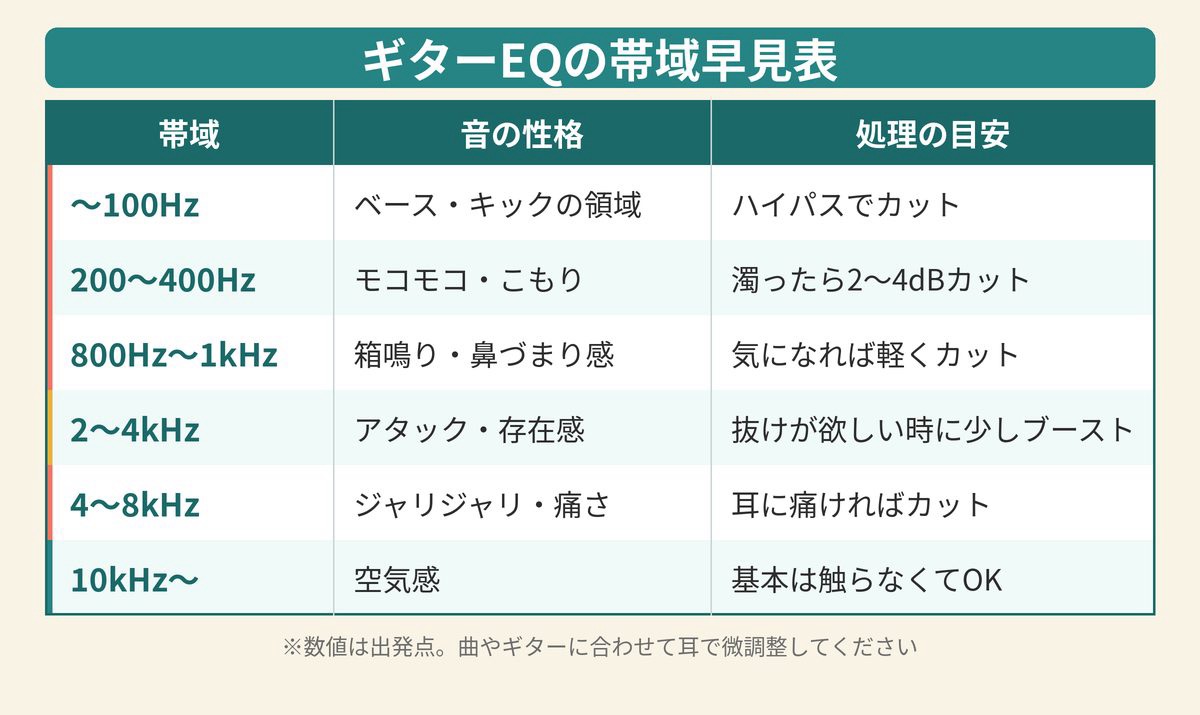
If you're unsure, look at this table.
| Band | Character | Guide |
|---|---|---|
| Below 100 Hz | Territory of bass and kick | Cut with a high-pass |
| 200 to 400 Hz | Boomy, muffled | If muddy, cut 2 to 4 dB |
| 800 Hz to 1 kHz | Boxy, nasal | Cut lightly if it bothers you |
| 2 to 4 kHz | Attack, presence | Boost a little when you want it to cut through |
| 4 to 8 kHz | Gritty, harsh | Cut if it hurts your ears |
| 10 kHz and up | Air | Basically fine to leave alone |
These numbers are only a starting point. The best answer changes with the guitar, the amp and the song, so always adjust while checking by ear.
Don't compete with the vocal for frequencies
Most of the time, a guitar feels too loud because it clashes with the vocal.
The sweet spot of a vocal is around 1 to 4 kHz.
For a song with vocals, give up just 1 to 2 dB in this band on the guitar side.
That alone pushes the vocal forward.
Step 3: How to Use a Compressor on Guitar
Next is the compressor.
Its role is to even out the swings in level and make it easier to listen to.
Does distorted guitar need a compressor at all?
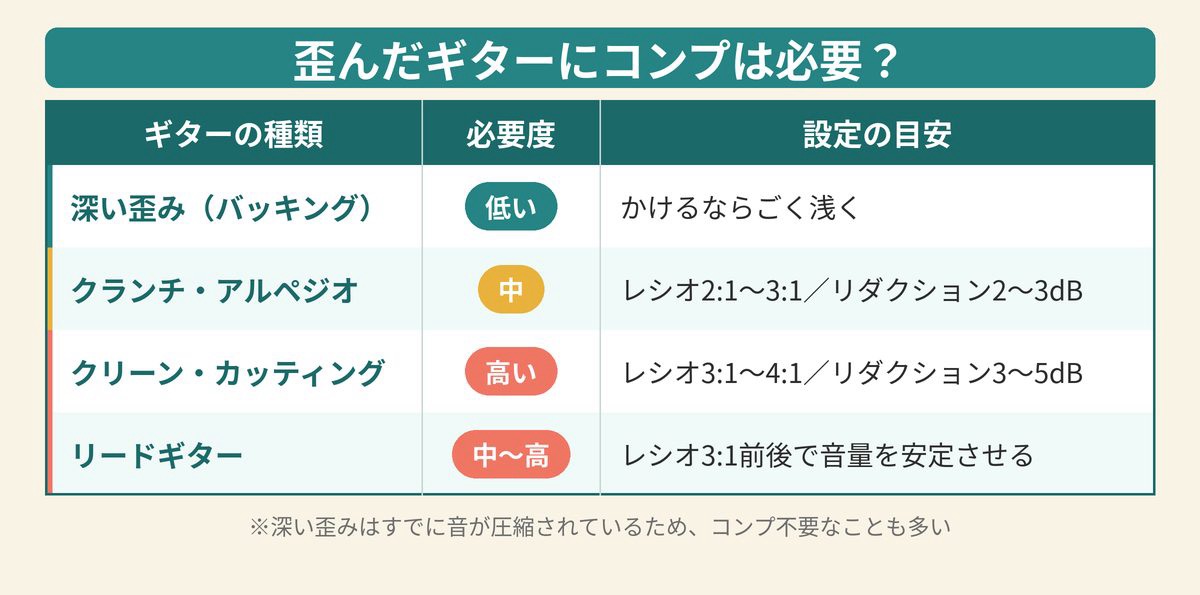
In fact, heavily distorted guitar is already compressed.
The distortion itself works like a compressor.
So the guideline for deciding is this.
| Type of guitar | Need for compression | Setting guide |
|---|---|---|
| Deep distortion (backing) | Low (often unnecessary) | If you use it, very light |
| Crunch, arpeggios | Medium | Ratio 2:1 to 3:1 / 2 to 3 dB reduction |
| Clean, chopping | High | Ratio 3:1 to 4:1 / 3 to 5 dB reduction |
| Lead guitar | Medium to high | Around 3:1 to keep the level steady |
Know the signs of overdoing it
If you compress too much, the sound dies.
If this happens, you've squashed it too far.
Signs of too much compression
・The attack of the picking disappears and the sound goes flat
・The sound pulls back and seems small
・A "hiss" of noise rises up
Step 4: Order and Use of Time-Based Effects (Reverb and Delay)
Once EQ and compression have things in shape, time-based effects come last.
Use sends, not inserts
Don't insert reverb and delay directly on the track.
The basic way is to use a send (bus).
There are three reasons.
Benefits of using a send
1. You can adjust the balance of the dry sound and the reverb separately
2. Several tracks can share the same reverb, giving the space a sense of unity
3. It greatly reduces CPU load
Using delay and reverb differently
Roughly speaking, it goes like this.
Delay is depth and width. Reverb is air and cohesion.
If you add deep reverb to a song with lots of parts, the whole thing turns muddy.
In that case, a short delay (slapback) is an effective way to create depth.
Finishing: Spread Two Guitars Left and Right
A classic band-sound technique is doubling.
Record the same part twice and pan the takes left and right.
Doubling basics
Record the same part twice, separately, and pan them L100 / R100. Note that a copy-and-paste duplicate won't widen the sound.
I plan to go deeper on stereo widening techniques in a separate article.
Guitar Mixing FAQ
Q. Do I need a monitoring setup?
For accurate judgments, you need monitor headphones or monitor speakers.
With listening earbuds, the low and high ends are exaggerated and you misjudge.
-
-
Best Studio Monitor Headphones for Home Recording | Closed-Back vs Open-Back and 9 Picks for Guitarists
"I mixed on regular listening headphones, and when I played it on my phone the low end was hollow..." It's a failure every guitarist who starts home recording experiences at least once. The cause is simple. Ordinary headphones have their sound flavored to make music "fun to listen to." If you mix using that sound as the reference, the balance falls apart when you hear it elsewhere. That's why you need monitor headphones. In this article, I'm ryo, 13 years of guitar and 8 years of DTM, and I explain how to choose monitor headphones and recommended models from the ...
-

-
Best Studio Monitor Speakers for Home Recording | 8 Picks by Budget for Guitarists
"My home-recording mixes just don't come together on headphones..." If you start feeling that, it's time to get studio monitor speakers. For a guitarist recording at home, headphones alone tend to lead you to wrong judgments. In particular, the "only my guitar sounds loud" problem becomes much easier to see once you put speakers in. In this article, I cover how to choose studio monitors and introduce 8 models by budget. By the time you finish reading, you should have decided on one that fits your room and budget. What you'll learn in this article The difference between ordinary speakers ...
Q. Is it okay to use presets?
Absolutely.
But a preset is a "starting point."
Adjust at least the low-cut position and the amount of reduction by ear.
Q. What should I do after mixing?
Next is mastering, which shapes the loudness and texture of the whole 2-mix.
-

-
How to Master Your Songs at Home (Beginner's Guide) | Steps, Cautions and Recommended Tools
What Is Mastering? The Final Finishing Step of Home RecordingMastering is the work of finishing a song after the mix is done into a "finished product." You even out the volume. You also even out the tonal balance. You get it to a state where it doesn't feel off when heard on streaming or CD. In home recording, many people run out of energy at the mix. But if you skip mastering, the sound seems small. When you upload to a streaming service, it has less punch than other songs. What to Do Before MasteringBefore mastering, review your mix. If ...
You can check the price of Total Studio 5 MAX at Plugin Boutique.
Summary: Guitar Mixing Isn't Scary If You Keep the Order
Finally, here are the key points of this article.
Summary of this article
・The order of processing is "gain → EQ cuts → compression → EQ boosts → time-based effects"
・Cut with EQ before you boost. A low cut is a must on every track
・Distorted guitar needs only light compression. Start with 2 to 3 dB of reduction
・Use reverb and delay on sends
・Always play doubled parts twice
You won't get good at mixing in a day.
But with just a pattern for the order, the time you spend lost drops sharply.
Try finishing one song by following this pattern.
For how to mix a whole band, see this article.
-
-
Mixing Basics | Putting Together Two Guitars, Bass, Drums and Vocals
What Is Mixing? Why Is It Needed?If you stack recorded sounds as they are, problems like these happen. The guitar is too loud and you can't hear the bass The whole thing is "muddy" and doesn't cut through Only the drums sound like they're floating You don't need to overthink it. Once you have the basics, it comes together well. The Basic Mixing Steps | Follow This Order and You Won't Get Lost The steps are simple. First, turn off EQ and compression on all tracks. Build a balance that works with raw volume alone. Spread the instruments left and ...

