"I loaded an amp simulator, but the sound is somehow thin."
"It's full of noise and unusable."
This is where people who come into DTM from guitar first stumble.
Most of the causes aren't the performance of your gear.
It's that the signal order and gain settings are still in the habit of a real amp.
What's scarier is using it wrong. It degrades your guitar's sound.
Even with expensive gear, one setting can ruin it.
This article sorts out the basics of amp simulators, written from a guitarist's point of view.
By the time you finish reading, you should know why your sound is thin. The reason will become visible.


What Is an Amp Simulator?
An amp simulator is a system that recreates the sound of a real guitar amp in software.
Even without buying a real amp, you can run an amp inside your computer.
You can rearrange tube amps, cabinets and even mic positions on screen. That's its strength.
Typical ones include IK Multimedia's AmpliTube and TONEX.
Bundled DAWs like Logic Pro also include a built-in amp simulator.
The Biggest Difference from a Real Amp
A real amp has the amp and speaker as one unit.
When you make sound, it reaches your ears as it is.
An amp simulator is different.
You have to build the sound's path yourself.
This "path" is exactly the signal order I explain next.
Understand the Basic Signal Order
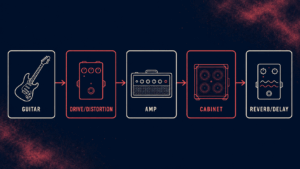
An amp simulator is divided into several parts.
Connecting them in the right order is the shortcut to a good sound.
The most basic order is as follows.
step
1Guitar (input)
First, the guitar's signal comes in. The level here is the foundation for everything.
step
2Compact-type effects (drive, wah, etc.)
These are effects placed before the amp. They're in the same position as the pedals at your feet with real gear.
step
3Amp (pre and power)
This is the center of sound design. The gain here decides the amount of distortion.
step
4Cabinet (speaker)
This is the part where the amp's sound is played through a speaker. The thickness and air of the sound change a lot here.
step
5Time-based effects (reverb, delay)
Finally, add reverb. The basic rule is to put it after the amp.
Key point
Drive goes "before" the amp, and reverb and delay go "after" the amp.
This is the basic form when you're unsure.
What Happens If You Get the Order Wrong
For example, suppose you put the reverb before the amp.
Then even the reverb tail gets distorted.
The result is a sound with a blurred outline. A muffled sound.
It's the same reason few people put reverb at their feet with real gear.
How to Think About Gain
After signal order, the next stumbling block is gain.
It should be the word guitarists are most familiar with.
But gain in an amp simulator is a little deeper.
Gain Is Not Only "the Amount of Distortion"
Many people think of gain as "the distortion knob."
That's half right.
But an amp simulator has another important gain.
That is the input gain.
The signal coming in from the guitar must not be too strong or too weak.
If this isn't right, no amount of amp adjusting gives a good sound.
Watch out
If the input level is too high, the sound breaks up (clips).
If it is too low, it gets buried in noise and the sound becomes thin.
A Guideline for the Right Input Level
Adjust while watching your DAW's meter.
Aim for peaks around minus 12 dB.
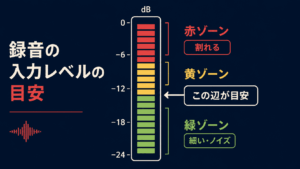
There's no need to raise it until it lights red.
Leaving a little headroom is just right.
Don't Raise the Amp's Gain Too Much
A common mistake in home recording is raising the gain too much.
If you remember playing a real amp at full blast, you want to add more distortion.
But a recorded sound overlaps with other instruments in the mix.
A sound that's too distorted loses its outline. It gets buried in the band.
A "good sound" live and a "good sound" in a recording are different things.
Note
"Slightly lacking when you listen to it alone" is often just the right amount of distortion in a mix.
3 Tips to Prevent a "Thin or Harsh" Sound
Once you have signal order and gain down, here's the final touch.
Here are three tips to prevent thinness and harshness.
- Try changing the cabinet's mic position
- Cut the highs just a little (EQ)
- Tidy up extra low end with a low cut
The cabinet's mic position in particular changes the sound dramatically.
The closer to the center, the stronger the highs; the more you shift it outward, the rounder it gets.
If it feels "harsh," first move the mic slightly outward.
The Input Settings on Your Audio Interface Change the Sound Too
So far it was about the software side.
But the settings on the audio interface side, where you plug in the guitar, change the sound a lot too.
In fact, get this wrong and the sound is already degraded at the entrance.
However much you adjust the amp simulator, you can't get back a source sound that's already thin.
The Difference Between INST (Hi-Z) and LINE
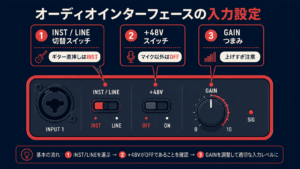
Many interfaces have a switch for changing the input.
It's labeled something like "INST," "Hi-Z" or "LINE."
This switching is to match the signal's impedance.
It's a difficult word, but think of it roughly as "how hard it is for the signal to flow."
When you plug the guitar in directly, set it to INST (Hi-Z).
A passive guitar's signal has high impedance. If you leave it on LINE, the highs drop and you get a muffled, thin sound.
Key point
Guitar straight in → INST (Hi-Z)
Through pedals or an amp simulator → LINE
This is the basic way to choose.
Conversely, sound that has gone through pedals at your feet or a multi-effects unit is different. The level is already set.
In that case, receive it on LINE as the basic rule.
+48V (Phantom Power) Should Basically Be OFF
Another important switch is +48V.
This is power dedicated to condenser mics.
When plugging in a guitar or pedals, always turn it OFF.
If you leave it ON when it isn't needed, you could damage your gear.
Watch out
+48V is "ON only when using a condenser mic."
For guitar and pedals, OFF is the iron rule.
The Labels Differ by Maker but the Roles Are the Same
These switches are on almost every interface.
Only the labels differ a little by maker.
| Role | Common labels | Setting guide |
| Guitar straight in | INST / Hi-Z / GUITAR | ON when plugging the guitar in directly |
| Line input | LINE / MIC-LINE | Use this for sound through pedals |
| Phantom power | +48V / Phantom / P48 | ON only with a condenser mic |
| Input level | GAIN / TRIM | Keep it modest, in a range where red doesn't light |
For example, the Apollo Twin Solo I use also has these four lined up as they are.
Once you know the label differences, you won't be lost even when your model changes.
Summary
Let's review the basics of amp simulators once more.
- Drive goes before the amp, time-based effects go after the amp
- Aim for input gain around minus 12 dB
- Don't raise the amp's gain too much
- When it's harsh, review the mic position and the highs
- Guitar straight in is INST; through pedals is LINE
- +48V is OFF except for condenser mics
Just keeping these in mind changes your home-recorded guitar sound a lot.
Before you buy more gear, review your settings first.
With your current setup, you should be able to get a sound a step better.

