Struggling Between Line and Mic Recording for Home Guitar?
When you record guitar at home, the first thing you run into is choosing between "line recording" and "mic recording."
The short answer: a guitarist who is just starting home recording should go with line recording.
But this does not mean "mic recording is bad." Each has what it suits and doesn't.
In this article, I'm ryo, 13 years of guitar and 8 years of DTM, and I sort it out. Based on experience using both, I put together the differences and how to choose.


What Is the Difference Between Line and Mic Recording?
First, let me sort out the terms.
Line recording is a method where you connect the guitar's signal directly to an audio interface (I/F below: the gear that brings guitar and mic sound into your PC). It is recorded as it is.
Mic recording is a method where you pick up the sound coming out of a guitar amp with a microphone. That is recorded as it is.
Picturing It with a Diagram
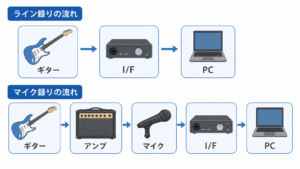
Roughly, the signal flow goes like this.
Line recording flow
Guitar → I/F → PC (amp sim inside the DAW)
Mic recording flow
Guitar → amp → mic → I/F → PC
*An amp sim is technology that recreates the sound of a real amp in software. TONEX and AmpliTube are typical examples.
Pros and Cons of Line Recording
3 Pros of Line Recording
step
1You can record without worrying about volume
The advantage is that you don't sound the amp. You can record at midnight, or in an apartment.
This is the biggest benefit in home recording.
step
2You can change the sound after recording
The raw signal recorded by line is called the "dry sound."
If you keep this dry sound, you can swap the amp sim later and redo the sound design.
step
3No mic or soundproofing needed
You need neither a mic stand nor a soundproof room. You can start with an I/F and a cable.
Cons of Line Recording
To be honest, there are cons too.
Watch out
Depending on the amp sim settings, the sound can feel "thin or harsh."
This is a problem you can solve with settings. I plan to cover it in detail in a separate article. Most of the causes are too much gain or a lack of cabinet settings.
Pros and Cons of Mic Recording

Pros of Mic Recording
The biggest appeal of mic recording is air.
The sound from the amp makes the air in the room vibrate. The mic picks that up. This whole chain creates a "live" feel.
It works especially well for roaring styles and when you want a sense of band unity.
Cons of Mic Recording
Hurdles of mic recording
- You have to play the amp loud
- You need a mic and a mic stand
- Room reflections (reverb) get into the sound
- It's hard to change the sound after recording
Home recording is different, especially in apartment buildings. Just getting the amp up to a sufficient volume is difficult.
There is also the dilemma that if you turn the volume down, the amp's real good sound doesn't come out.
The Author's Experience: I Settled on Line Recording
I've been recording at home for about 8 years.
I started with GarageBand on an iPad and an iRig. Now I use Logic Pro on Mac and an Apollo Twin Solo interface.
The reason I stopped mic recording is simple.
I only had time to work at night, and I couldn't play the amp.
When I turned the volume down to record, the sound wasn't what I wanted. Days went by when I couldn't record late at night.
After I switched to line recording, the hurdle to recording dropped at once.
I can record a phrase the moment I think of it, even at midnight. I feel this ease is the most important thing in home recording.
Today, amp sims like TONEX and AmpliTube are highly polished. Even with line recording, you can reach a good enough quality.
So Which Should You Choose?
Here it is by type.
| If you are... | Recommended |
| Just starting home recording | Line recording |
| In an apartment building / working at night | Line recording |
| Want to refine the sound afterward | Line recording |
| Have an environment where you can play loud | Consider mic recording too |
| Put live air first | Mic recording |
Summary of this article
- If you're starting home recording, line recording is the right place to begin
- Line recording lets you record without worrying about volume and change the sound later
- Mic recording has the appeal of air, but is a high hurdle at home
- What matters is to choose "a method you can keep up"
How to choose the I/F you need for line recording is explained in a separate article. Take a look at it too.
-

-
What Is an Audio Interface? How a Guitarist Should Choose One Without Failing
You want to record guitar on your PC. When you think that, the first thing you need is an audio interface. But "I've heard the name, but I don't know what it does." Many people feel that way. This article explains the basics and how to choose from a guitarist's point of view. I've included my own mistakes and tried to make it as clear as I can. Recommended for Anyone who wants to know what an audio interface is in the first place Anyone who wants to record guitar or bass at home Anyone who wants to choose the ...

