"I bought Logic Pro, but I don't know where to start."
Starting from that state is perfectly fine.
Logic Pro is a DAW with a lot of features.
But there isn't much you need to learn first.
This article walks through everything from initial setup to exporting a song, in order.
I've narrowed it down to "just this much to start" from the viewpoint of a guitarist or band player.

About yen prices
Prices in yen are Japanese street prices. As a rough guide at about 150 yen per US dollar: 5,000 yen is about $33, 10,000 yen about $67, 20,000 yen about $133, 30,000 yen about $200, 50,000 yen about $333 and 100,000 yen about $667. Prices in your region will differ, so check current prices before buying.
What Is Logic Pro? What Beginners Should Know First
Logic Pro is a DAW (music production software) made by Apple, exclusively for Mac.
It is serious software that is used in professional settings too.
But the operation is intuitive.
It is positioned as the upgraded version of GarageBand.
That's why it is designed so even beginners can get started easily.

-

-
Best DAWs for Guitarists Ranked | What to Choose for Home Recording
"I want to record guitar at home, but which DAW should I choose?" There are so many DAWs that people tend to stumble on the first one. In this article, I'm ryo, with 13 years of guitar and 8 years of DTM, and I've ranked the main DAWs honestly. The point of view is always that of a guitarist or band player. There are only three criteria. "Supported OS," "ease of recording guitar," and "budget." Look at just these, and you'll quickly find the one that fits you. 3 Points for Guitarists Choosing a DAW Before the ranking, let me ...
Price and How to Buy
You buy Logic Pro from the Mac App Store.
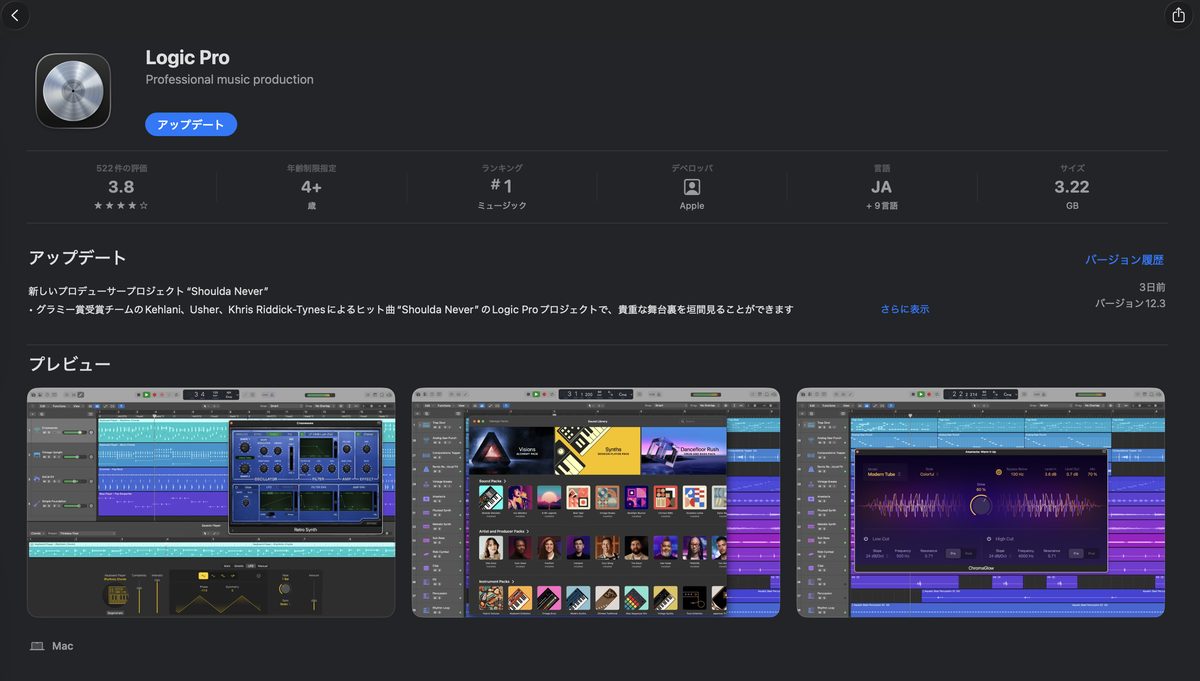
The price is a one-time purchase of $199.99 in the US (30,000 yen in Japan).
*Prices may change, so always check the latest price before buying.
Unlike a monthly DAW, you pay only once.
You also get updates for free.
Since January 2026, there is a new option too.
It is a subscription called "Apple Creator Studio" at $12.99 per month in the US (1,780 yen in Japan).
You can choose either a one-time purchase or the subscription.
The current Logic Pro 12 has requirements. It requires a Mac with Apple silicon and macOS 15.6 or later. It does not run on Intel Macs, so be careful.
The 90-day free trial was discontinued in January 2026. Now there is a trial period with Apple Creator Studio. It is a 30-day free trial (90 days for buyers of a new device). Always check the conditions before you buy.
Differences from GarageBand
You can record and program in GarageBand, which comes on every Mac.
I've put the main differences in a table.
| GarageBand | Logic Pro | |
|---|---|---|
| Price | Free | $199.99 (one-time; 30,000 yen in Japan) |
| Number of tracks | Up to 255 | Up to 1000 |
| Mixing features | Basic only | Professional grade |
| Bundled sounds and plugins | Fewer | A large amount |
| Third-party plugins | Usable | Usable |
Once it's installed, set up just two things before you start making music.
Audio Interface Settings
If you're going to record guitar or a mic, setting up your audio interface is a must.
Here are the steps.
Setup steps
- Open Logic Pro → Settings → Audio
- Change "Output Device" to the interface you're using
- Change "Input Device" to the same interface
- Click "Apply"
-

-
What Is an Audio Interface? How a Guitarist Should Choose One Without Failing
You want to record guitar on your PC. When you think that, the first thing you need is an audio interface. But "I've heard the name, but I don't know what it does." Many people feel that way. This article explains the basics and how to choose from a guitarist's point of view. I've included my own mistakes and tried to make it as clear as I can. Recommended for Anyone who wants to know what an audio interface is in the first place Anyone who wants to record guitar or bass at home Anyone who wants to choose the ...
Creating a New Project
After you launch Logic Pro, choose "New Project" → "Empty Project."
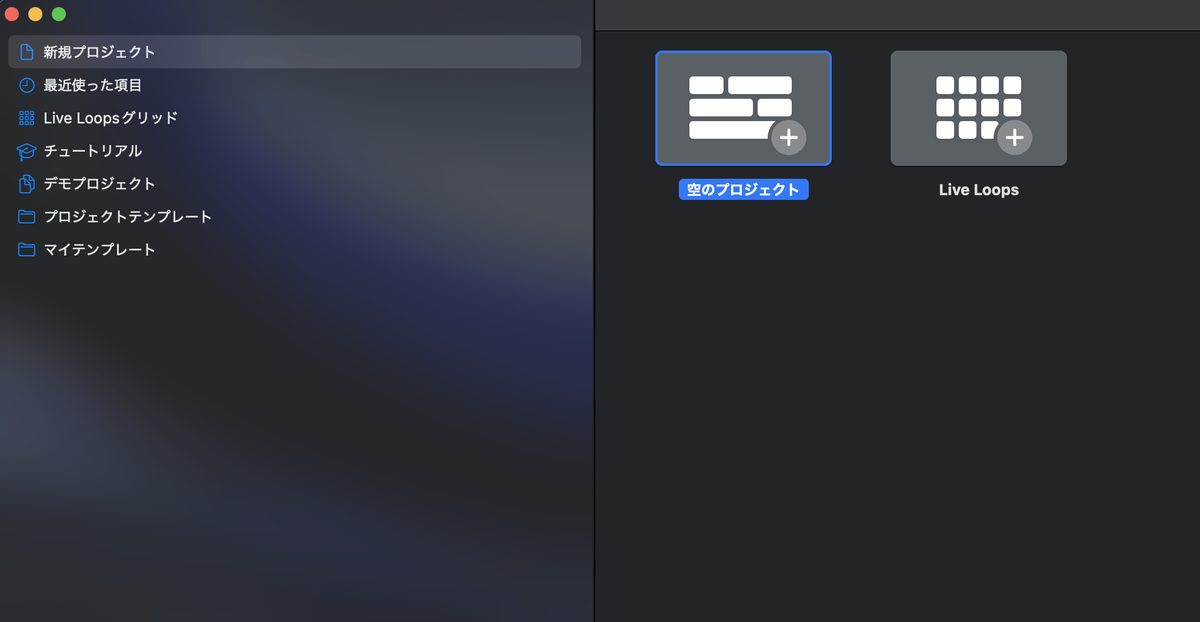
It asks what type the first track should be.
To record guitar, choose "Audio."
To program, choose "Software Instrument."
You can add more any time later, so there's no need to hesitate here.
When you create a project, set the tempo and key. It makes programming and using loops smoother later.
Reading the Screen | Just Learn 4 Areas
Logic Pro's screen looks like it has a lot of information.
But learning only 4 areas first is enough.
| Area | Location | Role |
|---|---|---|
| Tracks area | Center | The main screen for recording and editing |
| Library | Left side | Choosing sounds and presets |
| Inspector | Left side | Track volume and settings |
| Control bar | Top | Play, record and tempo |
From here, I explain the flow of actually shaping a song in 5 steps.
If you learn just this flow, you can finish a whole song.
Step 1: Create a Track
Add a new track with the "+" button at the top left of the tracks area.
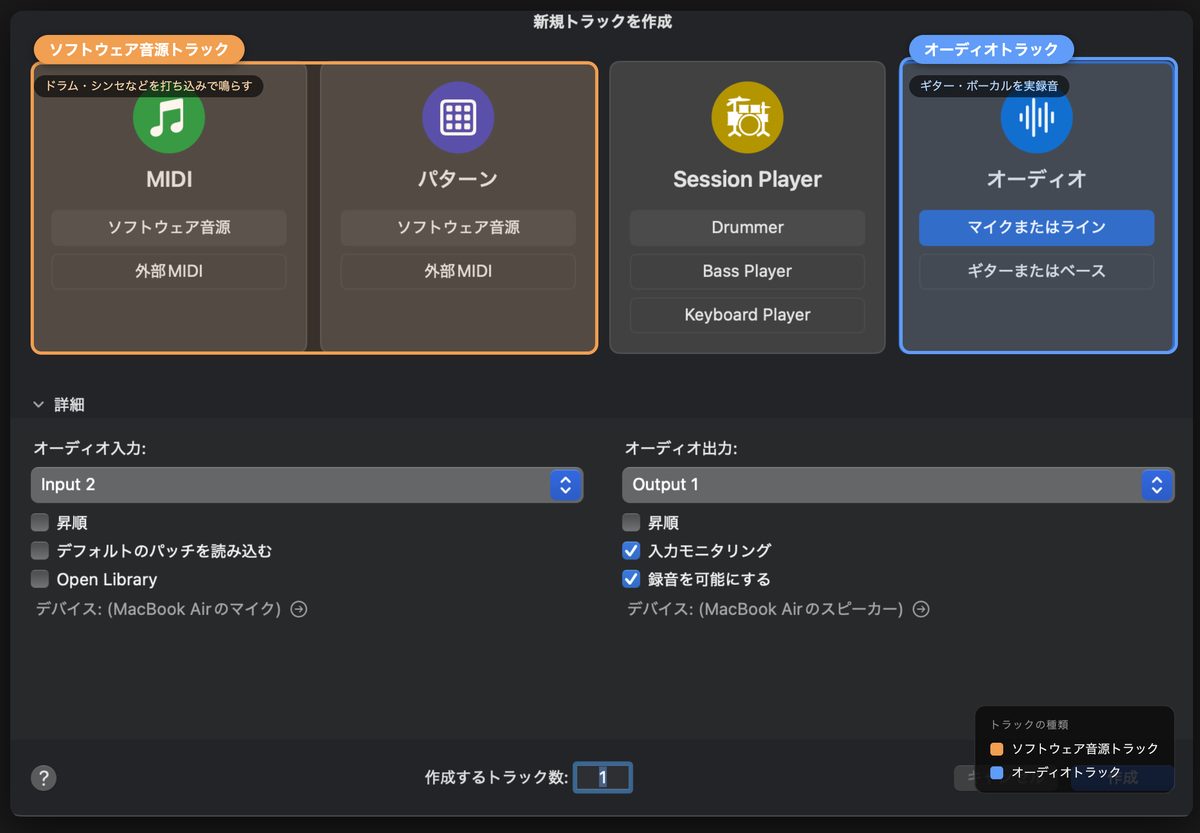
There are mainly two types of track.
Types of track
- Audio track: records "real sound" such as guitar and vocals
- Software Instrument track: plays drums, synths and more by "programming"
Step 2: Record
Choose an audio track.
Press the record button (●) at the top to start recording.
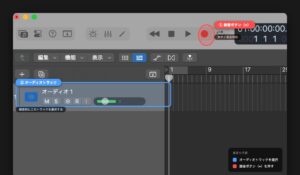
There are two things to check before recording.
The first is the input channel.
Check the input number your guitar is plugged into.
Match that number with the track's input setting.
The second is the input level.
Set it as high as you can without the meter going red.
-
-
How to Record Guitar in Logic Pro from Scratch (Beginner's Guide)
"I bought Logic Pro, but I don't know how to record my guitar." I'm sure many guitarists have that worry. I was the same at first. This article explains the steps for recording guitar in Logic Pro from zero. I explain technical terms as they come up. By the time you finish reading, you should be able to record one guitar track. What You Need to Record Guitar in Logic Pro First, let's check what you need. There are three main things. I/F is short for audio interface. Think of it as gear that brings the guitar's sound into the ...
Here are the basics of line recording with an amp simulator.
-
-
Amp Simulator Basics | Signal Chain Order and How to Think About Gain
"With an amp simulator, what do I actually connect to what?" When you start recording guitar in DTM, this is the first question you run into. There are lots of knobs, and the order of effects isn't clear either. Raise the gain and the sound gets crushed, lower it and it lacks punch. This article explains amp simulators. I'll break down the basic signal chain order and how to think about gain from the point of view of a home-recording guitarist. I've left out difficult theory as much as possible. Learn this shape first, and you can apply it from ...
Step 3: Add Parts by Programming
Even if you can't play drums or bass, you can add them by "programming."
Create a Software Instrument track.
The basic operation is placing notes on the Piano Roll screen.
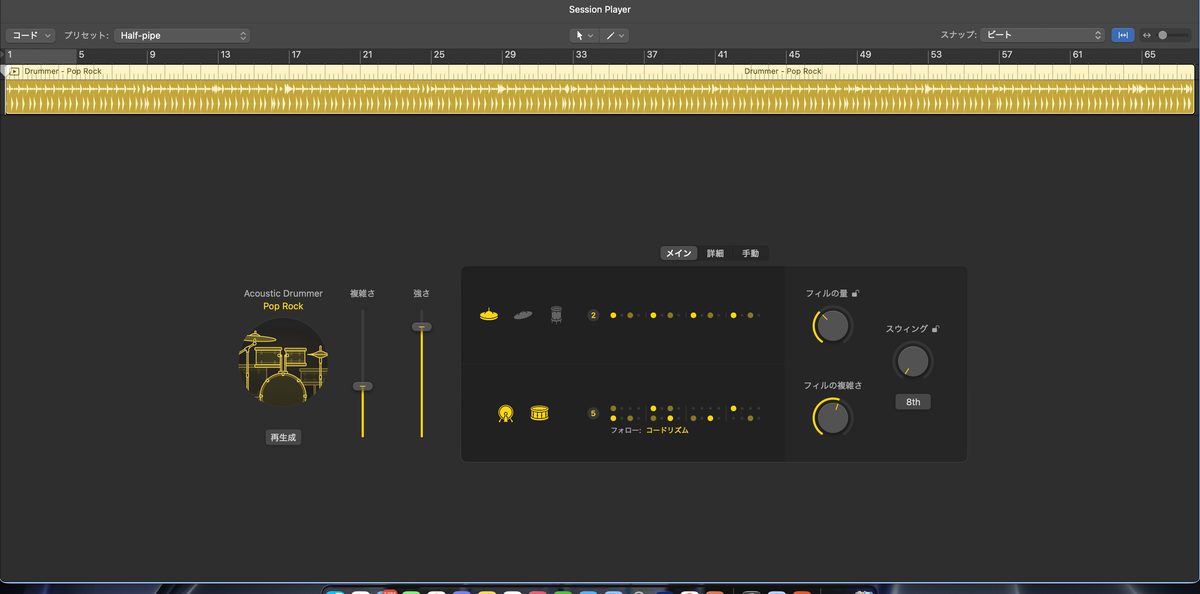
And what guitarists will like is the Session Players feature.
Drummer is one of the Session Players.
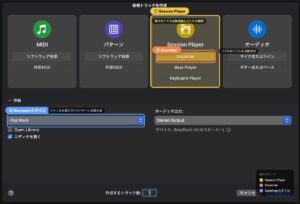
With Drummer, just choosing a genre automatically generates a realistic drum pattern.
For making a band demo, this alone is enough.
Step 4: Balance the Mix
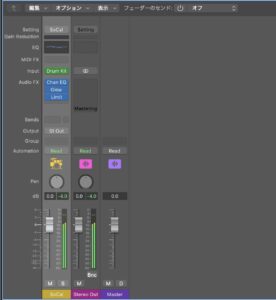
Once recording and programming are done, balance the volume of each track.
Press the "X" key to open the mixer.
The basic operation is moving the faders up and down.
I explain how to think about mixing, using a band lineup as the example, in this article.
-
-
Mixing Basics | Putting Together Two Guitars, Bass, Drums and Vocals
What Is Mixing? Why Is It Needed?If you stack recorded sounds as they are, problems like these happen. The guitar is too loud and you can't hear the bass The whole thing is "muddy" and doesn't cut through Only the drums sound like they're floating You don't need to overthink it. Once you have the basics, it comes together well. The Basic Mixing Steps | Follow This Order and You Won't Get Lost The steps are simple. First, turn off EQ and compression on all tracks. Build a balance that works with raw volume alone. Spread the instruments left and ...
Step 5: Export (Bounce)
When the song is finished, export it to a single audio file.
The steps are "File" → "Bounce" → "Project or Section."
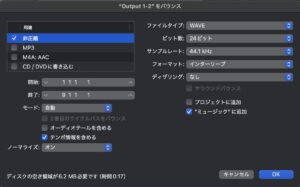
Use the format according to your purpose.
| Format | Use |
|---|---|
| WAV / AIFF | When high quality is needed, such as for distribution or submitting a master |
| MP3 | Sharing with bandmates, checking demos |
Set the bounce range to include the tail of the last note of the song. If the cycle range is short, the reverb tail gets cut off partway.
3 Logic Pro Features Guitarists Should Use First
After the basic operations, here are 3 features that go well with guitarists.
Amp Designer | The Built-in Amp Simulator
Logic Pro comes with a built-in amp simulator called "Amp Designer."
It costs nothing extra.
You can make everything from clean to high gain.
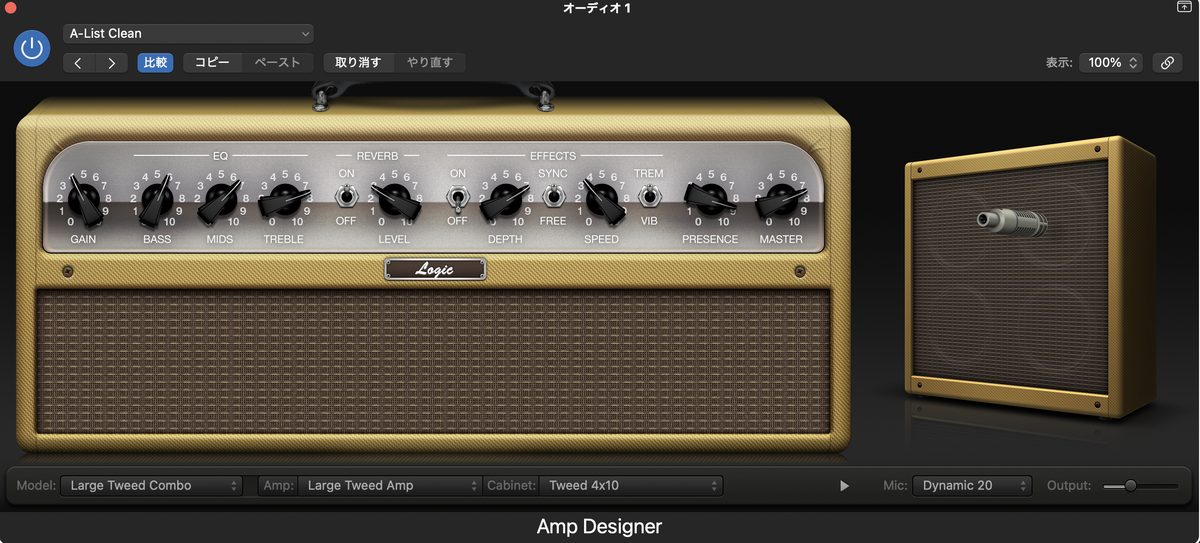
For paid amp simulators, TONEX MAX and AmpliTube 5 MAX v2 are the standards.
Both can be used as plugins in Logic Pro.
-

-
Logic Pro's Built-In Amp Designer Review | How Far Can It Go for Guitar?
When you launch Logic Pro, Amp Designer is ready to use from the start. No extra cost. No installation. You can start playing right away. This review comes from someone with 13 years of guitar and 8 years of DTM. It is based on years of continued use. What Is Amp Designer? It is the amp simulator built into Logic Pro. It recreates the character of famous real amps, cabinets and mics, part by part. You can choose the amp, cabinet and mic independently of each other. Characteristics of All Models and the Genres They Suit Amp Designer's models are ...
Session Players (Drummer) | Automatically Generate Drums
Drummer, which I mentioned earlier, is one of a group of features called Session Players.
It is a strong ally for guitarists.
Just choose a genre and a drummer, and it automatically generates a pattern to fit the song.
You can adjust "complexity" and "volume" intuitively on an XY pad.
For band demos, making a rough draft with Drummer first is the fastest way.
Apple Loops | A Royalty-Free Library of Material
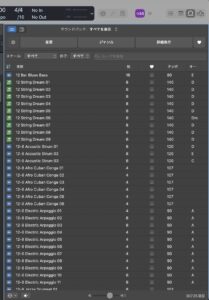
Apple Loops is a large library of loops that comes with Logic.
In the current version, it is integrated into a search screen called the "Sound Browser."
It also supports natural language search.
You can add drum loops and synth phrases to a song just by dragging and dropping.
The tempo and key automatically match the project, so even beginners can handle them easily.
Logic Pro FAQ
Summary | Learn Logic Pro in 5 Steps
Finally, here are the key points of this article.
Summary of this article
- Logic Pro is for Apple silicon Macs only, at $199.99 one-time in the US (a subscription is also available)
- For the first setup, only the audio interface input and output are needed
- Making a song is 5 steps: "create a track → record → program → mix → export"
- The shortest route for guitarists is to start with Amp Designer and Session Players (Drummer)
If you try to learn every feature of Logic Pro, you'll give up.
First, finish one song with the 5 steps in this article.
The experience of finishing one song is the quickest path to getting better.
The actual guitar recording steps are explained in the article introduced above.

