What you'll learn in this article
- How to sign up, buy and download at Plugin Boutique
- How Virtual Cash (5% back) works and how to use it
- How to get free gifts and Rewards+ tokens
- How to check your license code
- The refund policy and cautions before buying
When buying plugins, have you ever had questions like these?

Plugin Boutique is a shop that carries many plugins used by guitarists and home-recording players.
But its own points system and free gift mechanism are hard to understand. I get the impression that many people lose out.

This article explains everything from signing up to buying and downloading. I introduce the whole process with real screenshots.
About yen prices
Prices in yen are Japanese street prices. As a rough guide at about 150 yen per US dollar: 5,000 yen is about $33, 10,000 yen about $67, 20,000 yen about $133, 30,000 yen about $200, 50,000 yen about $333 and 100,000 yen about $667. Prices in your region will differ, so check current prices before buying.
What Is Plugin Boutique?
Plugin Boutique is a digital store (reseller) that sells music production software.
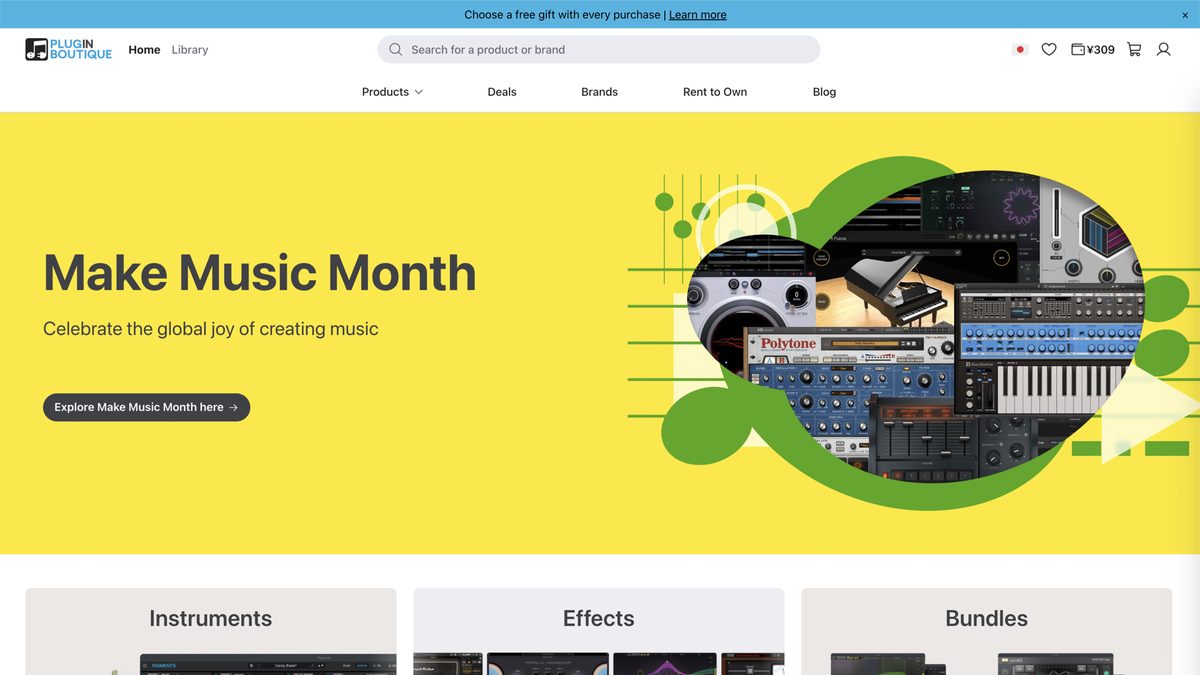
The range it carries is wide. Amp sims, effects, synths, drum instruments: nearly every plugin used in DTM is there.
Main features of Plugin Boutique
- Carries a wide range of plugins from major developers
- 5% of your purchase amount accumulates as Virtual Cash
- Buying eligible products gets you a free gift plugin
- Rewards+ tokens are granted for purchases over a certain amount
- Rich big sales such as Black Friday
Prices are shown in dollars, euros and pounds.
Key point
Plugin Boutique is a "reseller." So you need to be careful about refund and license rules. Remember that they depend on each developer's policy.
How to Create an Account
First, create an account.
step
1Go to the Plugin Boutique site
Go to pluginboutique.com.
step
2Click "Sign Up"
Click the "Sign Up" button at the top right.
step
3Enter the required information
Enter your email address, password and username.
step
4Complete email verification
A confirmation email arrives at the address you registered. Click the link to complete verification.
How to Buy and Download from Plugin Boutique
From here, I explain the whole flow of buying and downloading a plugin using real screens.
As an example, let's look at buying UAD Paradise Guitar Studio.
Step 1: Search for the product
Search by product name or developer name in the search bar at the top of the screen.
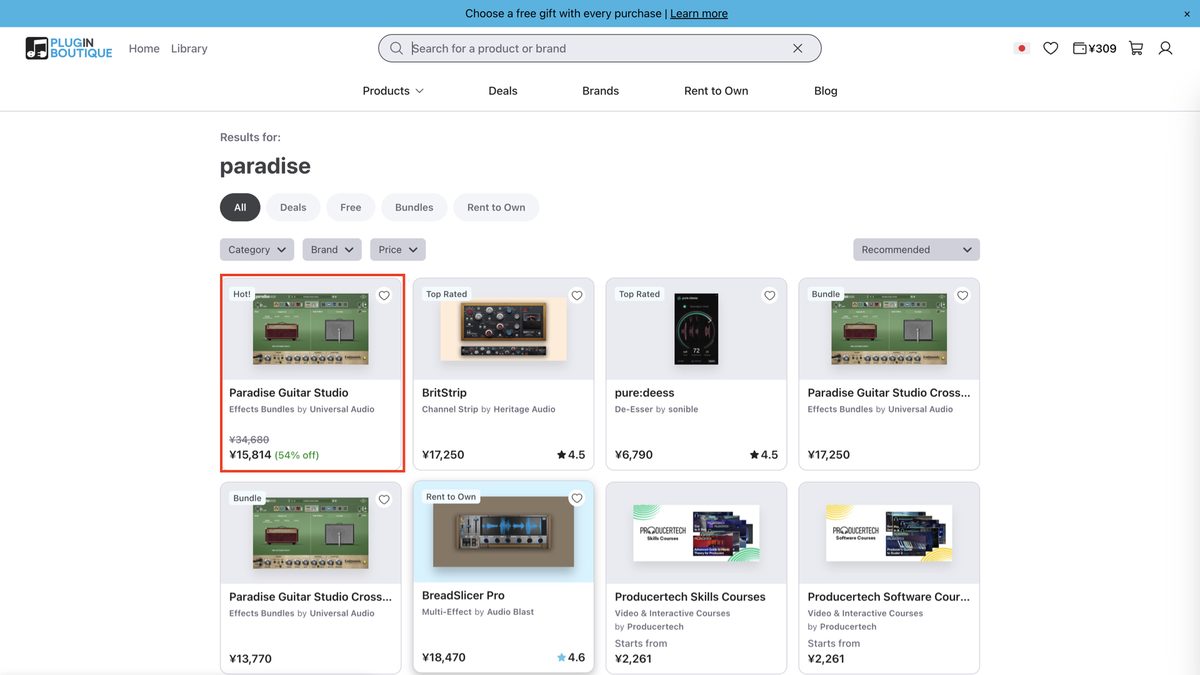
The search results show the price, discount rate and rating together.
Step 2: "Add to Cart" on the product page
On the product page, check the price, discount rate and free gift candidates.
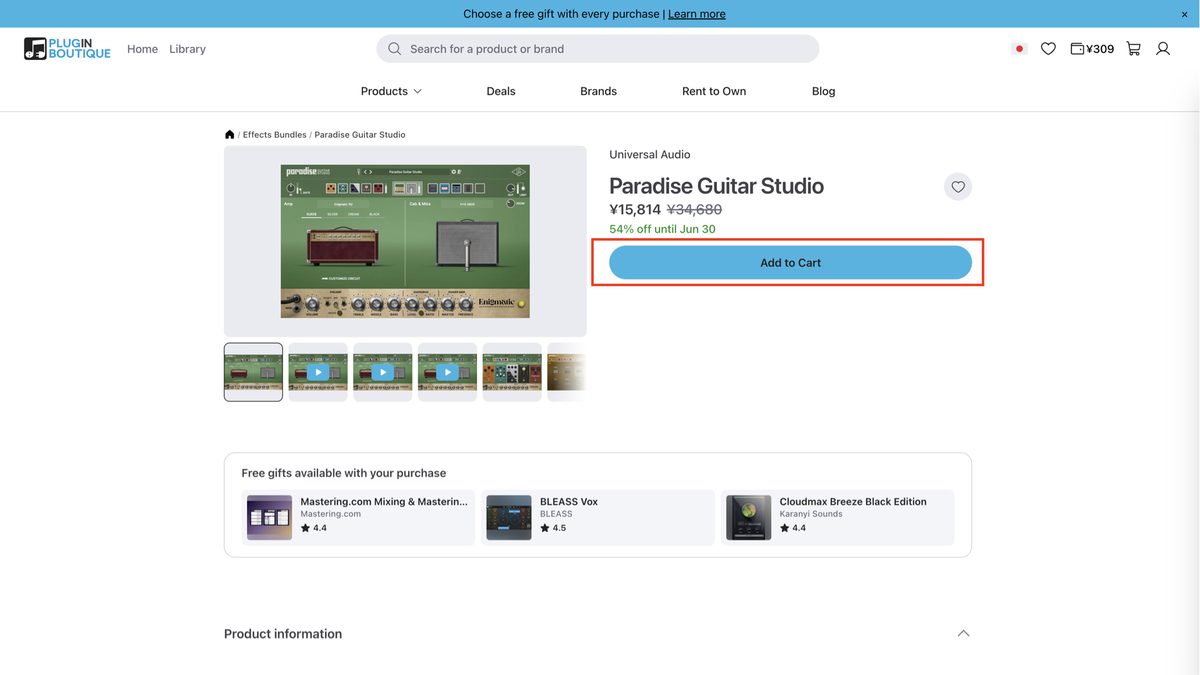
On the product page you can choose how to buy: "One-time purchase" or "Rent to Own."
At the bottom of the page, there is a display of free gifts. These are the candidates you get with this purchase.
Step 3: Choose a free gift in the cart
When you add it to the cart, a cart sidebar opens on the right of the screen.
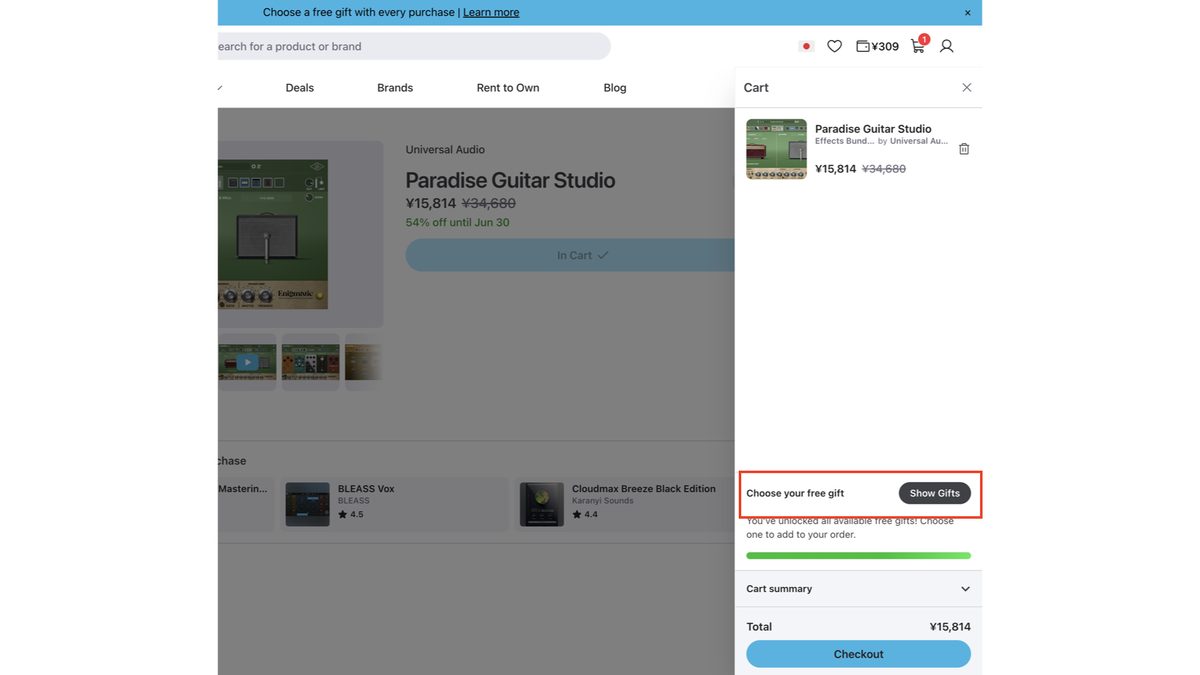
Press the "Show Gifts" button under "Choose your free gift." A list of free gifts you can get appears.
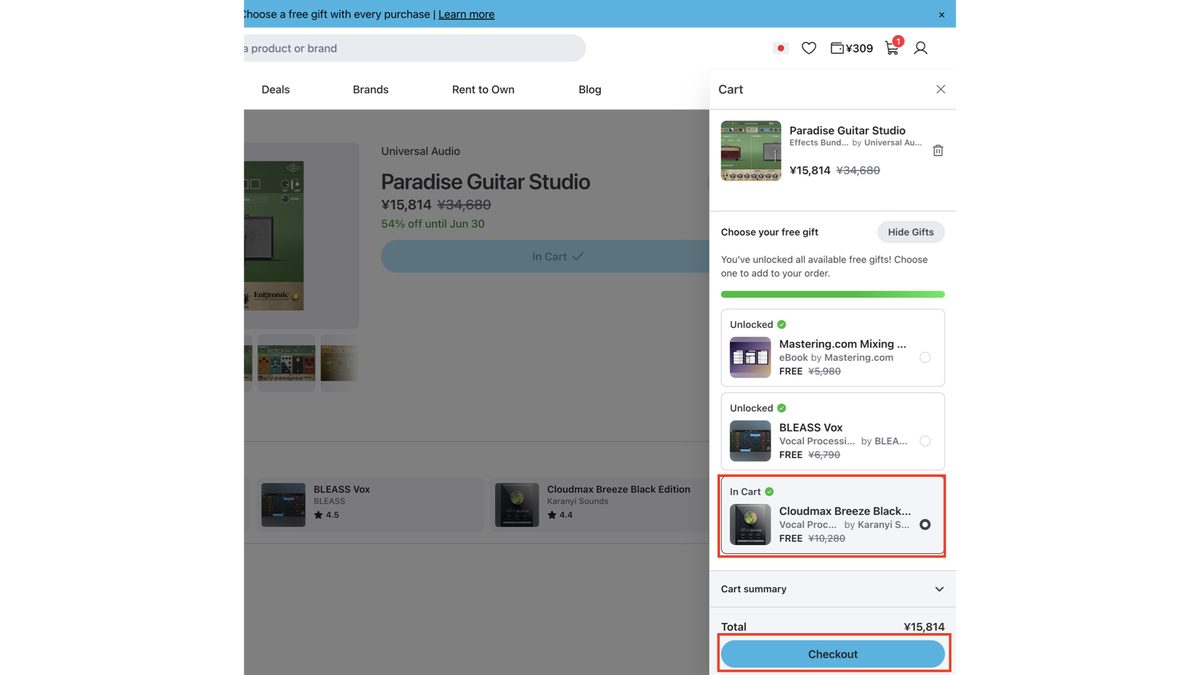
Choose one you like from the candidates. This time I chose Cloudmax Breeze Black Edition. Its regular price is ¥10,280.
Key point
The green progress bar on the cart screen shows "how much more you need to buy to choose a higher gift." If the bar is full, you can choose from all the gifts.
When you've chosen, click "Checkout" to go to payment.
Step 4: Choose a payment method and buy
On the checkout screen, enter your contact details, billing details and payment method.
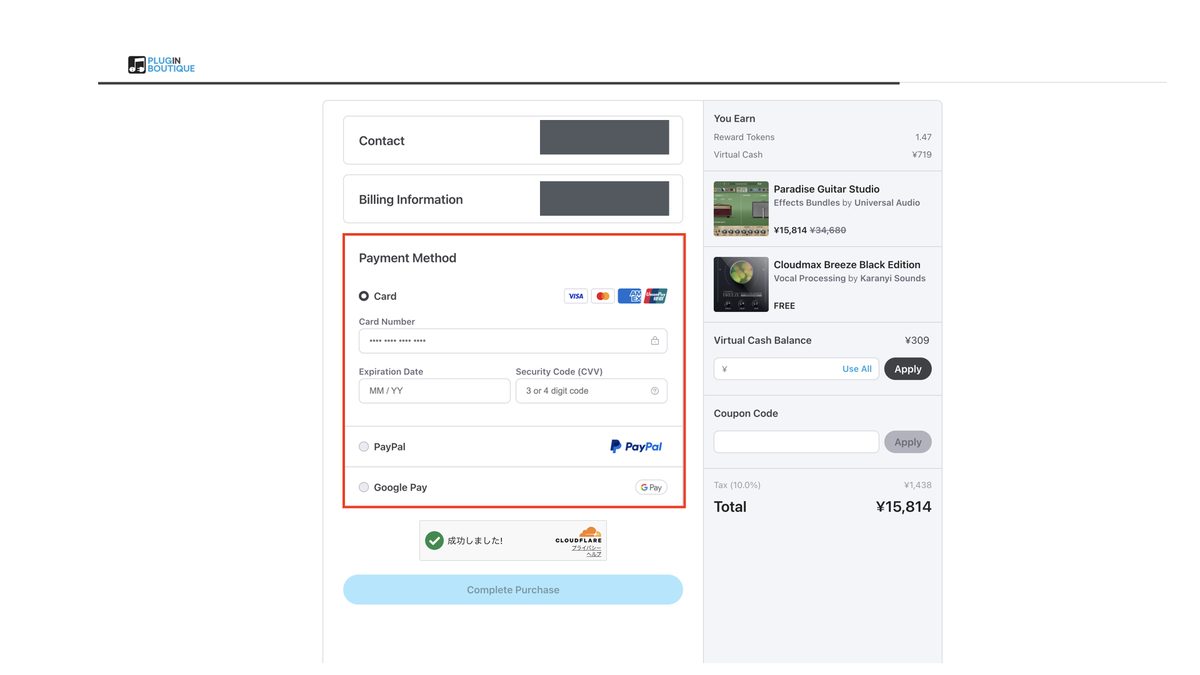
You can choose from the following payment methods.
- Credit card (Visa, Mastercard, Amex, UnionPay)
- PayPal
- Google Pay
The summary on the right also shows your Virtual Cash balance and the VC you will earn.
Watch out
Using a VPN or a mismatch in billing information can put an order on temporary hold. It's safest to turn the VPN off when you buy.
Press "Complete Purchase" and the purchase is complete.
Step 5: Check the purchase complete screen
Once the payment goes through, the purchase complete screen appears.
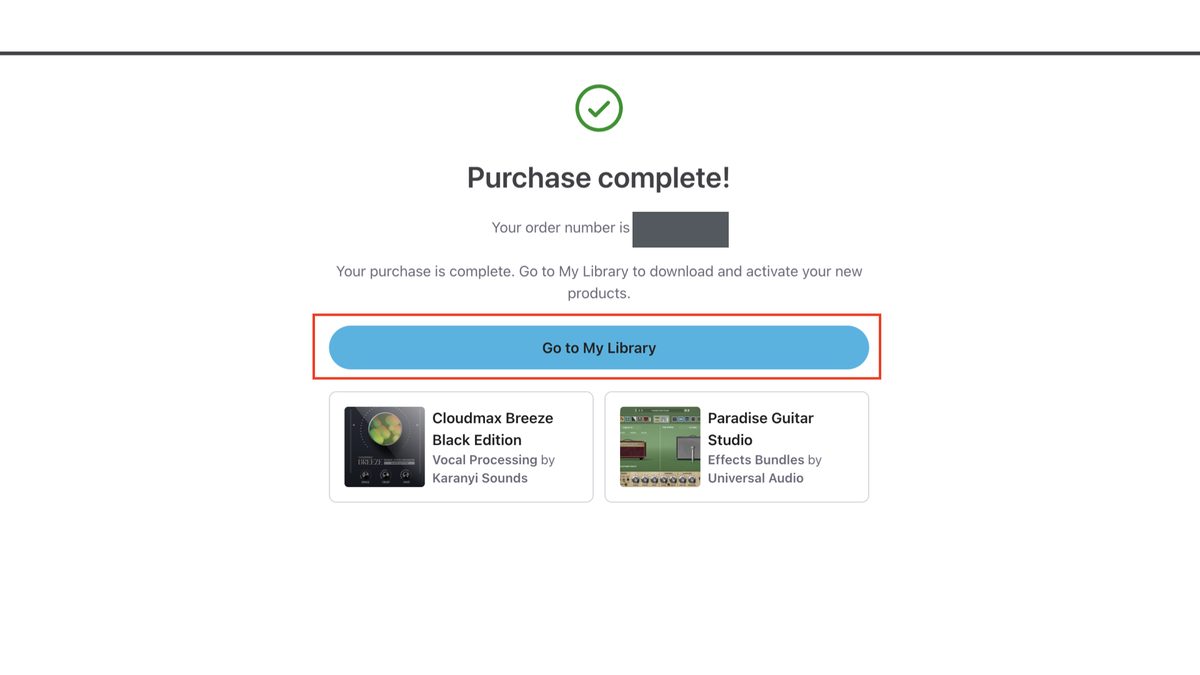
The product you bought (Paradise Guitar Studio this time) is shown. The free gift you chose is shown beside it.
Press "Go to My Library" to go to the list page of plugins you bought.
Step 6: Download the plugin from My Library
On the "My Library" page, you can see the plugins you bought in a list.
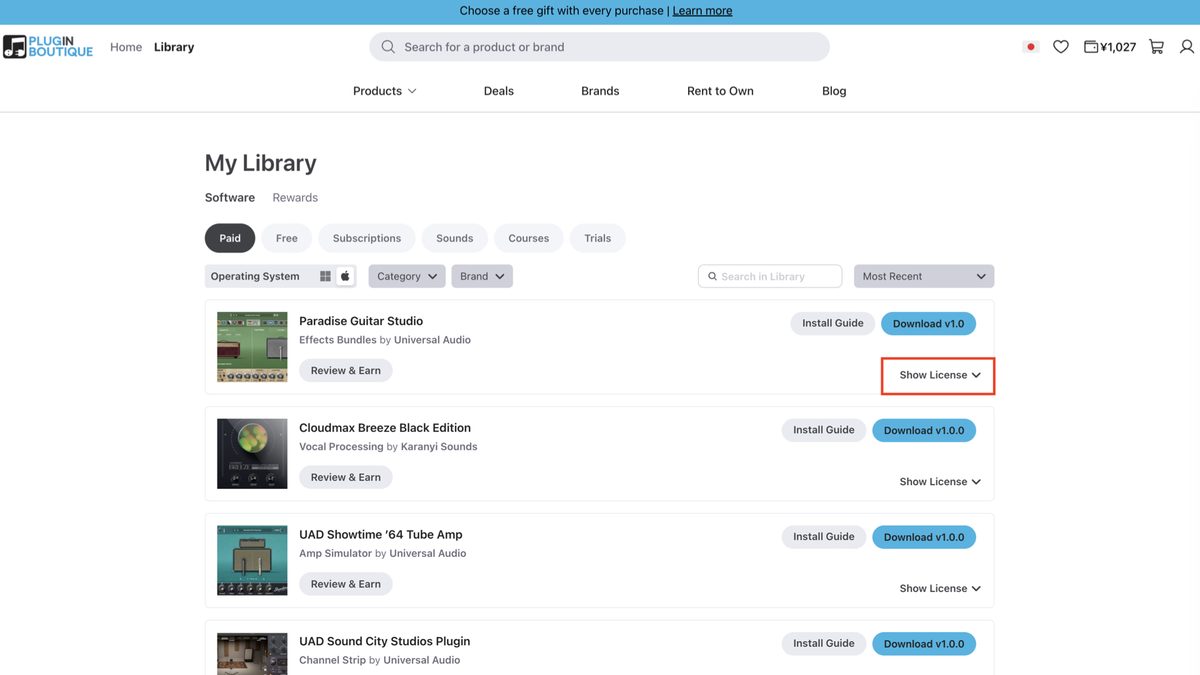
Download the installer with the "Download" button on the right of each plugin.
Switch the OS with the "Operating System" icon at the top of the screen. Mac and Windows are supported.
Step 7: Check and copy the license code
You can check the serial number or activation code for each plugin. You do it from the "Show License" button.
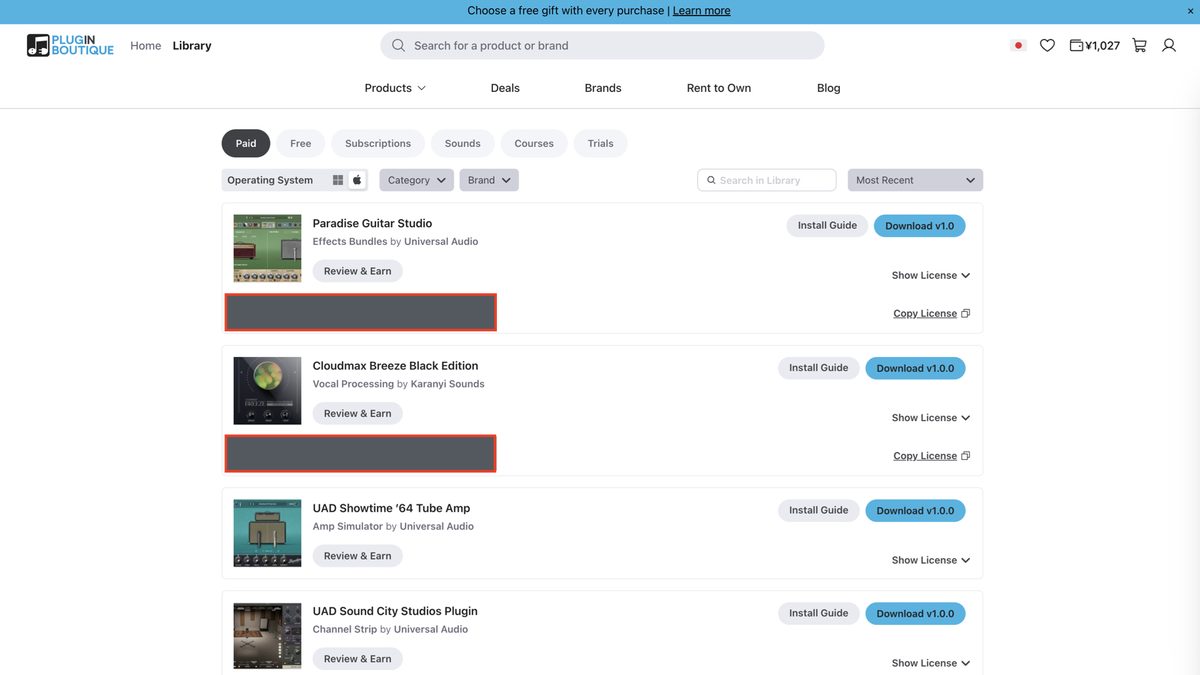
Click it and the license code appears. Press "Copy License" to copy it to the clipboard.
Watch out
Where you register the license code differs by developer. Typical examples are UA and IK Multimedia. The basic rule is to register at each one's dedicated page.
Step 8: Download the plugin itself from the developer's app
This is the point where people most easily make a mistake.
Watch out
What you download from My Library in Step 6 is, in many cases, an installer. The plugin itself is basically downloaded from the developer's dedicated app.
For UAD plugins (this example)
For UAD (Universal Audio), you use the dedicated app "UA Connect."
step
1Download "UA Connect" from the Universal Audio site
Download and install "UA Connect" from uaudio.com.
step
2Sign in to UA Connect
You need a Universal Audio account. If you don't have one, create one here.
step
3Enter the serial key
Paste the license code you copied in Step 7 into the activation screen inside UA Connect.
step
4Download the plugin itself in UA Connect
Once the license is authorized, the plugin appears in UA Connect. If you download and install the plugin itself from there, you can use it in your DAW.
For other developers
Besides UAD, most developers provide a dedicated management app.
| Developer | Management app |
|---|---|
| Universal Audio | UA Connect |
| IK Multimedia (TONEX, AmpliTube) | IK Product Manager |
| Plugin Alliance / Brainworx | Plugin Alliance Installation Manager |
| Native Instruments | Native Access |
| iZotope and iLok-compatible plugins in general | iLok License Manager |
Key point
The basic flow is common. Download the app → sign in → enter the serial → download the plugin itself, in that order. Only the app's name differs; what you do is the same for every developer.
What Is Virtual Cash? How It Works
Plugin Boutique's own points system is "Virtual Cash (VC)."
Think of it as a kind of "wallet" in your account.
The basic mechanism
5% of your purchase amount is granted as Virtual Cash.
For example, if you buy a $100 plugin, $5 worth of VC accumulates.
How to check your balance
You can check your VC balance in the Rewards section inside "Library" in your account. You can also check it on the checkout screen.
Watch out
If you pay the whole amount with Virtual Cash alone, that order isn't eligible for a free gift. If you want the gift too, combine it with a little cash (card or PayPal).
What Are Rewards+ Tokens?
Separately from VC, there is also a token system called "Rewards+."
Plugin Boutique plans to start a new membership program in October 2026.
The official help center announces that this token system will be discontinued along with it.
Your Virtual Cash balance is not affected. If you still have tokens, exchange them for VC or similar early.
How it works
If you spend £50 / €60 / $75 or more in a single purchase, you get one Rewards+ token.
You can exchange this token for one of the following.
| Exchange for | Contents |
|---|---|
| A free sample pack | Choose one from Loopmasters royalty-free material |
| A coupon code | A code that gets you a big discount or a free plugin |
| Extra Virtual Cash | Exchange for £1.25 / €1.50 / $1.50 of VC |
Free Gift Conditions Summary
How to get a free gift is as you saw in the buying steps. Let me summarize the conditions again.
- Only paid products are eligible (free products aren't)
- The more you buy, the higher the gift you can choose (check the bar in the cart)
- Rent to Own (installment purchase) isn't eligible
- Orders paid in full with VC or a coupon aren't eligible
- One gift per purchase, and no exchanging or reselling
Key point
You get one gift per purchase. If you want several, "buy separately" and you get a gift each time. Conversely, if you're aiming at "one lavish gift," buying together to unlock a higher gift is advantageous.
Black Friday and Plugin Boutique
Plugin Boutique holds a big sale every year at Black Friday in November.
Tips for making the most of Black Friday
- Register the plugins you want on your wishlist beforehand
- Save up VC and stack it on top of the sale price
- If you're aiming for a free gift, avoid paying fully with VC
- Sale periods are sometimes extended into the New Year, so don't rush
Refund Policy and Cautions
Plugin Boutique is a reseller. Refunds depend on the developer's policy.
Basic refund rules
| Period | Conditions |
|---|---|
| Within 14 days | Full refund only if you haven't downloaded, activated or authorized the product |
| Within 30 days | If the product is faulty or differs from its description, a refund or exchange |
Watch out
Once you activate a product, you generally can't get a refund. A refund for "I didn't check the system requirements" isn't accepted either. Always check the system requirements before buying.
FAQ
Summary
Here is a recap of how to use Plugin Boutique.
- From signing up to buying and downloading, just follow the on-screen instructions
- Check downloads in My Library and licenses in Show License
- Download the plugin itself in the developer's dedicated app (UAD → UA Connect, etc.)
- Enter the license code in the developer's app or site (not in the plugin itself)
- Virtual Cash accumulates 5% of your purchase, and you can use any amount
- Orders paid fully with VC aren't eligible for a free gift
- Rewards+ tokens are granted for purchases of £50 / €60 / $75 or more
- One gift per purchase; buy separately if you want several
- No refunds after activation; check with a demo beforehand